Tutorial
Click on thumbnailed images to enlarge
So you have made a cute brush set in Photoshop, but still wondering how to save multiple brushes in just one file ? Learn how to do that with my tutorial!
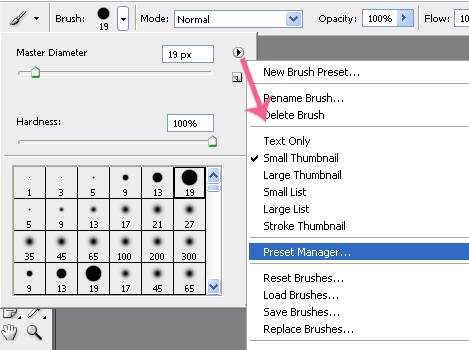
1. Click on the little arrow icon in the Brushes window and choose Preset Manager -
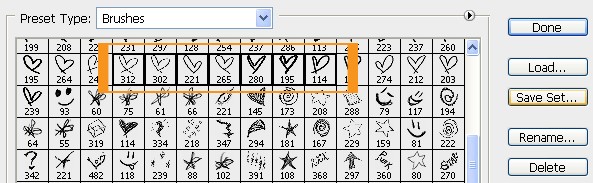
2. Select your brushes: Click on one brush, hold Shift and select all your brushes like this -
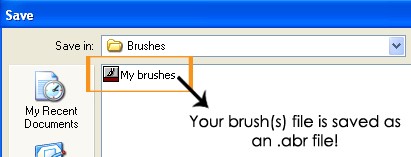
3. Click on Save Set.. and type the brush set name and click Save
Now you can upload your brush set to DeviantArt so that other people can use it!
Hope you enjoyed this tut! Any questions ? PM me :)
1. Click on the little arrow icon in the Brushes window and choose Preset Manager -
2. Select your brushes: Click on one brush, hold Shift and select all your brushes like this -
3. Click on Save Set.. and type the brush set name and click Save
Now you can upload your brush set to DeviantArt so that other people can use it!
Hope you enjoyed this tut! Any questions ? PM me :)
Tutorial Comments
Showing latest 8 of 8 comments

thank you :D
By -Evenstar- on Dec 14, 2008 10:20 am

tnx (:
By heartDesire on Dec 12, 2008 10:36 am

This is cool, but When i try to select more than one brush on photoshop cs3 it won't let me. I promise you, i'm using the shift button. Holding it down. i've tried the control button too, any ideas on how to combat this?
By poprocksugar on Dec 12, 2008 3:38 am

very cool.
By futura on Dec 10, 2008 5:58 am

thankyou so much. i've been waiting for this forever
By Broadway on Dec 8, 2008 9:55 pm

thanks! btw can u give me the link to download the love and star brushes? :D
i like it
By miekoCHAN on Dec 8, 2008 4:14 pm

nice , thz u
By nolee on Dec 7, 2008 5:15 pm

thnx for sharing ^.^
By x13abiez on Dec 7, 2008 8:11 am
Tutorial Details
| Author |
sunshine07

|
| Submitted on | Dec 6, 2008 |
| Page views | 5,483 |
| Favorites | 25 |
| Comments | 8 |
| Reviewer |
manny-the-dino
|
| Approved on | Dec 7, 2008 |