
Tutorial
Click on thumbnailed images to enlarge
Note: This tutorial is for people with some Photoshop knowledge....Beginners can try it too, but you must know your way around Photoshop and ImageReady!
Before :

After :

Let's start! :D
First, you need a plug-in called VM Natural Sparkle plug-in. Download here OR here.
Extract the file to your Plugins > Filters folder.
I'm using Photoshop 6.0 so it will usually have this address :
C:/Program Files/Adobe/Photoshop 6.0/Plug-Ins/Filters
And make sure you have your Photoshop closed while you do that.
Now open up Photoshop.
Step 1: Open up the image you want to add sparkles to. I'm using this cute picture I got from Photobucket. Duplicate your image layer two times and rename these three layers as Layer 1, 2, and 3.
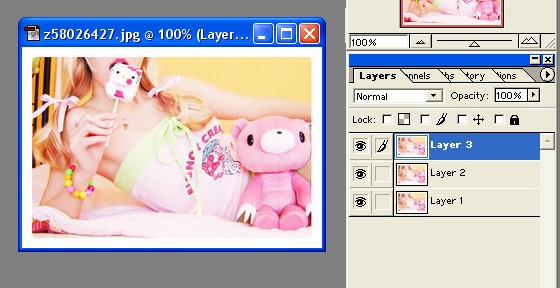
Step 2: Click on Layer 1 and go to Filters > VM Natural > Sparkle. And apply these settings :
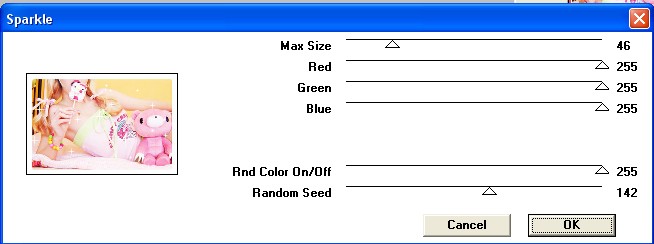
Step 3: Click on Layer 2 and apply these settings for the sparkles :
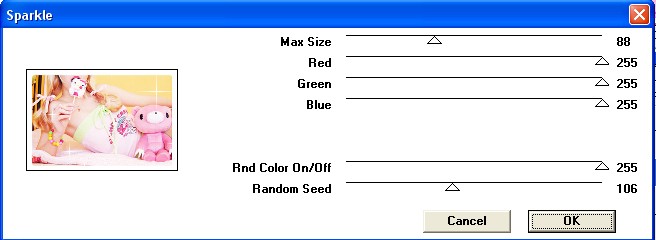
Step 4: Click on Layer 3 and apply these settings for the sparkles :
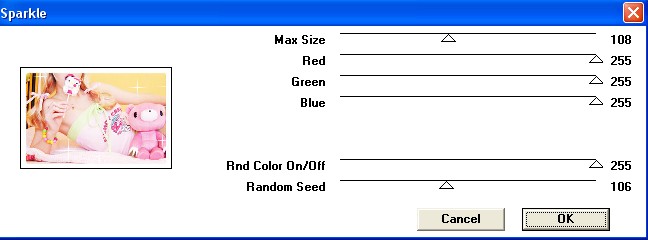
You need not necessarily apply these settings, just play around and get different sparkles for each layer. :D
Step 5: Click on the Jump to ImageReady button OR for CS3 users, click on Window > Animation
Now make 2 new frames by clicking on the little arrow button in the Animation
window :
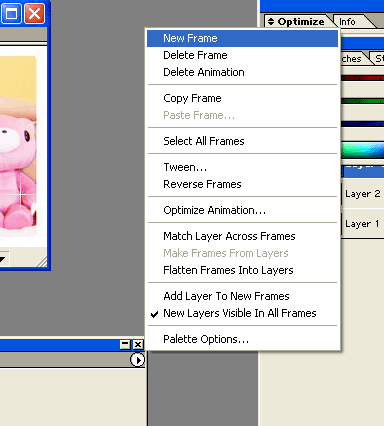
Step 6: On the first frame, make all the layers invisible (by clicking on the eye) except Layer 1.
On the second frame, make all layers invisible except Layer 2.
On the third frame, make all layers invisible except Layer 3.
Step 7: Now you're done! Press the play button and if you like the animation, save it! :D
It wasn't that hard, was it ? :D
Remember to save it like this : File > Save as Optimised
For CS3 : File > Save for Web Devices.
My Finished Product:
This same process can be done to text or any images you want.
Another image I did with this process :

If you got stuck anywhere or have any questions, please comment me :)
Before :
After :
Let's start! :D
First, you need a plug-in called VM Natural Sparkle plug-in. Download here OR here.
Extract the file to your Plugins > Filters folder.
I'm using Photoshop 6.0 so it will usually have this address :
C:/Program Files/Adobe/Photoshop 6.0/Plug-Ins/Filters
And make sure you have your Photoshop closed while you do that.
Now open up Photoshop.
Step 1: Open up the image you want to add sparkles to. I'm using this cute picture I got from Photobucket. Duplicate your image layer two times and rename these three layers as Layer 1, 2, and 3.
Step 2: Click on Layer 1 and go to Filters > VM Natural > Sparkle. And apply these settings :
Step 3: Click on Layer 2 and apply these settings for the sparkles :
Step 4: Click on Layer 3 and apply these settings for the sparkles :
You need not necessarily apply these settings, just play around and get different sparkles for each layer. :D
Step 5: Click on the Jump to ImageReady button OR for CS3 users, click on Window > Animation
Now make 2 new frames by clicking on the little arrow button in the Animation
window :
Step 6: On the first frame, make all the layers invisible (by clicking on the eye) except Layer 1.
On the second frame, make all layers invisible except Layer 2.
On the third frame, make all layers invisible except Layer 3.
Step 7: Now you're done! Press the play button and if you like the animation, save it! :D
It wasn't that hard, was it ? :D
Remember to save it like this : File > Save as Optimised
For CS3 : File > Save for Web Devices.
My Finished Product:
This same process can be done to text or any images you want.
Another image I did with this process :
If you got stuck anywhere or have any questions, please comment me :)
Tutorial Comments
Showing latest 10 of 14 comments

thank you :)
By SheRocksSolo on Dec 29, 2009 7:24 am

Can this be done using CS2 ?
By JoJoDsign on Jul 22, 2009 3:52 pm

awesome i love it haha i've looked at this time b4 but i just now figured it out cuz the controls are dif in 7
By epiclyts on May 30, 2009 1:09 am

omg i put the sparkle in the plug in somethign wrong with my photoshop -.- i need to reinstall
By x13abiez on Dec 7, 2008 7:43 pm

can u help me with the plug in pls
idk wat to do im sort of lost i dont knoe where to put the plug in
By external-town on Dec 1, 2008 3:13 am

omg ahhh i love this! thanks so much!
By AznDDRlover on Nov 19, 2008 12:38 am

can PS3 do that? ^.^
By nolee on Oct 27, 2008 9:30 pm
i'm having problem w/ plug in!!??
how do i even extract it into photoshop???? that's the problem!
By choualee12 on Oct 23, 2008 5:24 pm
There is no VM Natural in CS3 =(
By ohsnapx3 on Oct 22, 2008 5:33 pm

Thanx alot fo da help man it really helped me out
great tutorial
By lianitis on Oct 21, 2008 11:41 am
Tutorial Details
| Author |
sunshine07

|
| Submitted on | Oct 16, 2008 |
| Page views | 23,899 |
| Favorites | 94 |
| Comments | 14 |
| Reviewer |
manny-the-dino
|
| Approved on | Oct 17, 2008 |