Designer's Comments
Look carefully for specific instructions
***WHEN USING THIS LAYOUT, REPLACE ALL XXXXXXS WITH YOUR FRIEND ID BEFORE HITTING "SAVE ALL CHANGES," OR MYSPACE WILL CORRUPT ALL OF YOUR LINKS***
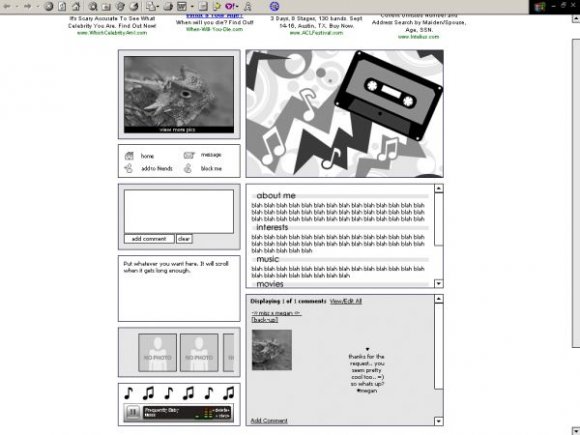
I have received requests for both masculine layouts and more default-style layouts, so this is my attempt to knock out both at once. I can't say I'm that fond of it, because it's not my style, but I like my cassette tape. :D
I designed this with the intention of having you edit it to your liking, although you obviously don't have to if you like it already. If you want to edit the color of the "tables," save the image from the link ending in .gif that is in the "layoutbg" DIV layer, edit to your liking, then re-upload the image, and replace the old URL with the new. To edit just the header, do the same thing to the link ending in .gif that is found in the "header" DIV.
Most of the stylesheet is in the About Me section, but please only edit it if you know what you're doing. I made the scrollbars neutral so that you don't necessarily have to edit them.
To replace the photo of the lizard with your own photo, find the image link http://cbimg6.com/layouts/07/06/29/18858ad.jpg in the Who I'd Like to Meet section, and replace it with a link to your own photo. It will fit best if you crop it to have a width of 192px, and a height of 123px. This image link is located in the DIV layer titled "me"
If you wish to replace the header image with your own image, replace the second image link that ends with .gif. It's inside the DIV layer called "header"
To edit the color of the tables, you will need to edit the layout graphic directly. The layout graphic is the first image link ending with .gif in the Who I'd Like to Meet code. It's inside the "layoutbg" DIV layer. Save the image to your computer, edit it to your liking, then re-upload it to a photo hosting site, and replace the link.
To add photos of your friends in place of the tiny thumbnails, replace each instance of ttp://cbimg6.com/layouts/07/06/29/18858ak.gif with the URL to your friend's photo, and the corresponding friendID with that person's myspace friend ID. I recommend that you resize each friend's photo to 65px x 65px. That way they will fit nicely into the scrolling area. :)
Pretty much all of the titles of the DIV layers should give you a hint as to what part of the layout this code represents, so it shouldn't be too difficult to figure everything out. Good luck, and have fun!
P.S. I would appreciate it if you didn't remove my credit. I put a lot of work into the coding for this layout, so I would like some recognition. You can move the credit to wherever you want, just be sure to link back to my layout page: falsetigerlimbs.createblog.com/layouts/
Using This Layout
For specific instructions read designer's comments
- This is a div overlay layout, html knowledge required!
- 1. Log into myspace.com
- 2. Click on Edit Profile (Profile 1.0)
- 3. Copy (ctrl c) and paste (ctrl v) code to the specified fields
Layout Comments
Showing latest 10 of 144 comments

glass wool blanket
glass wool board
rock wool blanket
rock wool board
xps board
aluminum silicate felt
aluminum silicate board

How can I change the background? :x

ZOMG, I like this...thats probably why i faved it :D
anyone kno if or how i can put an imeem player on this layout
how would i put a picture as a background behind everything (replacing the gray background)?

sonic, go to this URL (remove any spaces that may be in it) for the new about me for this layout, with the music player fixed:
falsetigerlimbs.net/ca ssetteabout.txt
the ad was also hidden, which can get your myspace deleted, so i changed that. the nav bar shows, but in order to hide it properly i'd have to change the positioning on everything, which i dont want to do. you can try some of the nav bar hide codes on here but they will probably also hide the comment box.
It's because this layout is old, sonic, and myspace has changed some stuff since then. I will take a quick look at the music player, but I'm only going to work on it for 30 minutes and if I can't fix it you're out of luck. I'll comment back here with the outcome. I normally no longer provide support on here because I have a paying layout job that I have to spend 20 hours a week on.
i have a problem with the music player can you help me? becouse this layout its very good
total, that code isn't compatible with this DIV overlay. that code is only for regular profile layouts. If you want you can stop the comment area from scrolling... just find this in about me:
.comt {width:347px; height:233px; overflow-x:hidden; overflow: auto;
and remove overflow-x:hidden; and change overflow:auto; to overflow:hidden;
only like one or two comments will show then but that's the best you'll be able to do

sorry but i guess it didnt show this is the link to the code
http://myspace-crash-codes.c om/blog/codes/hide-comments-2/
Layout Details
| Designer |
falsetigerlimbs

|
| Submitted on | Jun 29, 2007 |
| Page views | 150,079 |
| Favorites | 810 |
| Comments | 144 |
| Reviewer |
mzkandi
|
| Approved on | Jun 29, 2007 |