Tutorial
Click on thumbnailed images to enlarge
**NOTE**
I did this tutorial in Photoshop CS3 Extended which is why some of you may have problems. However, that does't mean this tutorial won't work in other versions of Photoshop. Just try it out.
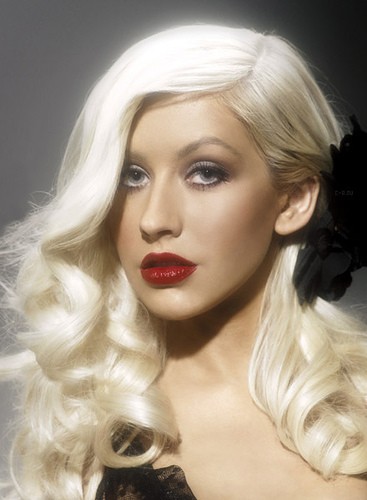
Want to learn how to make you picture look like as if it was weaved like a basket? Well I will show you how in this tutorial. The tutorial is pretty simple but requires a lot of work, I will admit. I will be using the stunning Christina Aguilera as my subject this time. Here is the before:
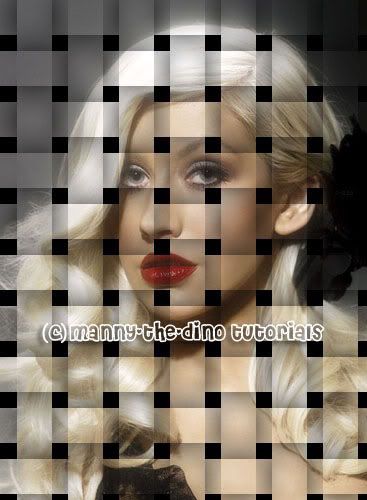
Here is the after:
Okay let's start! :)
001.First, open up your picture.
002.Do a ctrl+j twice, making 2 copies of the background layer. Rename the top one "Vertical Strips" & the middle on "Horizontal Strips."
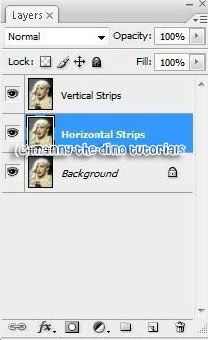
003.Press "D" on your keyboard to reset your FG & BG colors & with your "Background" layer selected, do a atl+backspace. This will fill that layer with black.
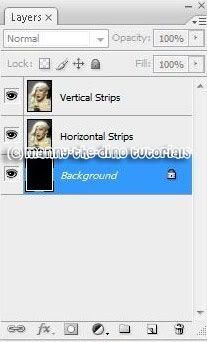
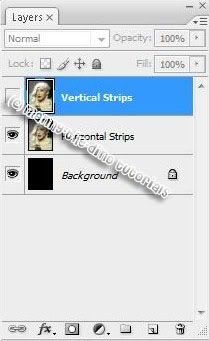
004.Now click on the eyeball icon to the left of the "Vertical Strips" layer in the Layers palette to temporarily turn the layer off.
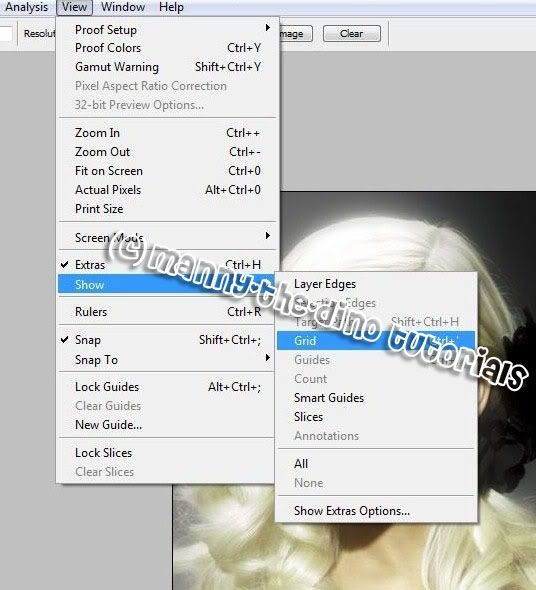
005.Now go View>Show>Grid.
006.A grid will appear on the picture. But don't worry, this can be turned off & on. So don't panic! lol. When your grid appears, if you find that you can't see it very well because the grid color is blending in with the colors of your image, press Ctrl+K to quickly bring up Photoshop's Preferences. Apply the following settings:
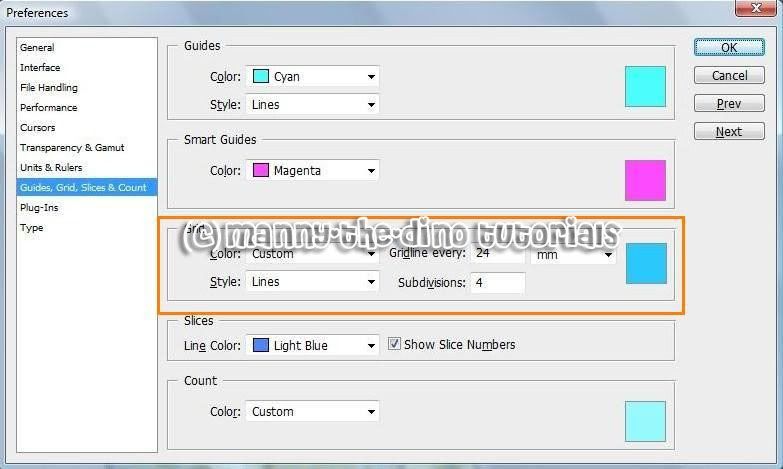
007.Click Ok & you picture should look like mine. Of course except for the color you choose. :)
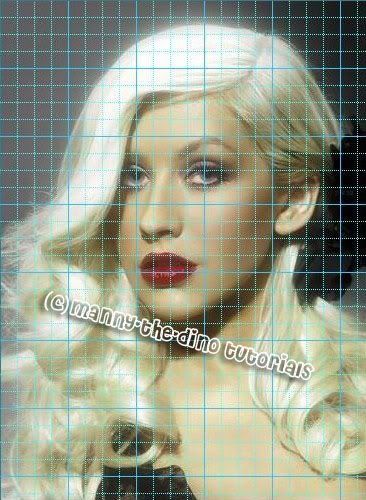
008.Now select you Rectangular Marquee Tool (M). We're going to start on the horizontal strips.
009.Firstly, make sure you have your "Horizontal Strips" layer selected. We are going to create the horizontal strips that are two grids high, with one grid row seperating them from each other. If the picture you are using has a person or persons in it, start off by making your first strip on their eyes. That way their eyes show up in the final product. If you have no idea what I mean by that, just look at my screenshot: To make another stip, hold down shift. Do that for all of them.
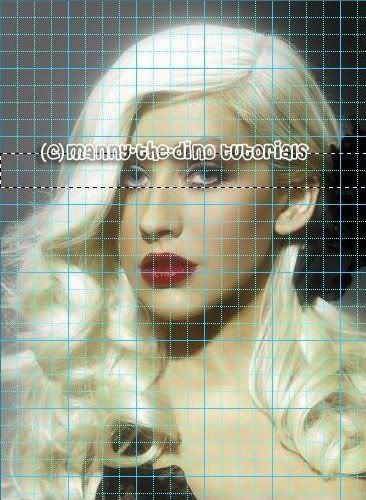
010.When you're done making all your horizontal strips, your picture should look like this:
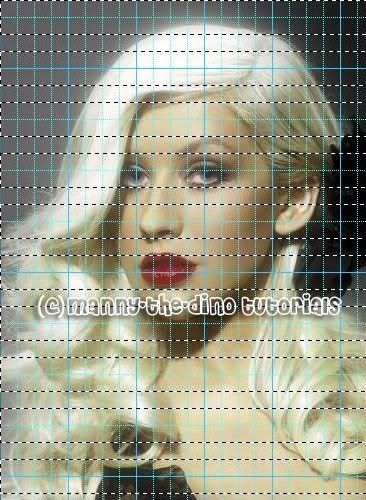
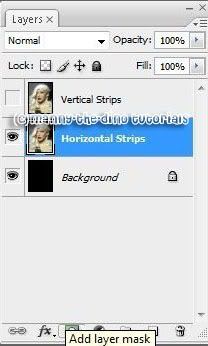
011.With your "Horizontal Strips" layer selected, add a layer mask.
012.After that, you picture should look like this:
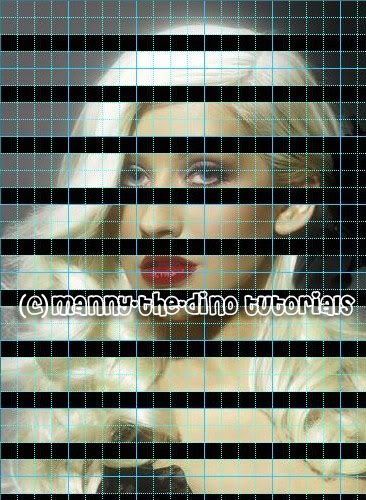
013.Do a ctrl+' to take off the grids & see how it looks like. Your horizontal strips are now created!
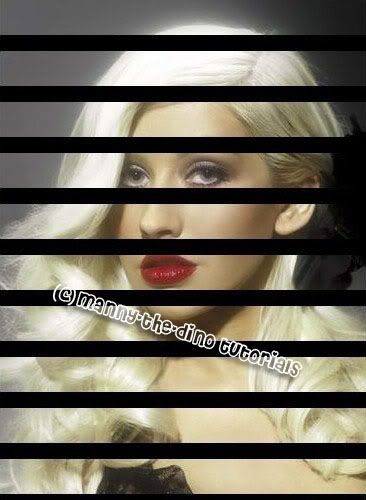
014.Now click on the eye for "Vertical Strips" so it can appear again & so we can do our vertical strips.
015.Make your vertical stips now. Two grids high, with one grid row seperating them from each other. Make sure you hold down shift to make more stips. Otherwise you will just deselect the first strip. Your picture should look like this now:
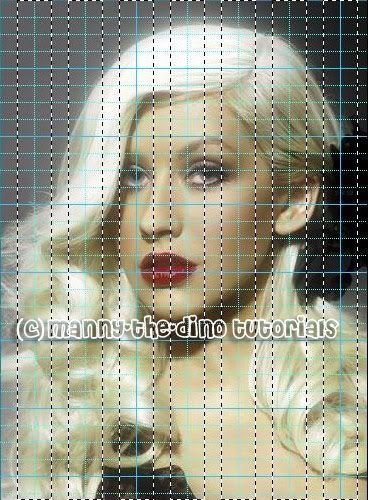
016.After you're done doing that, select your "Vertical Strips" layer and add a mask layer.
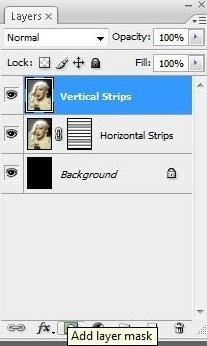
017.Your picture should look like this now:
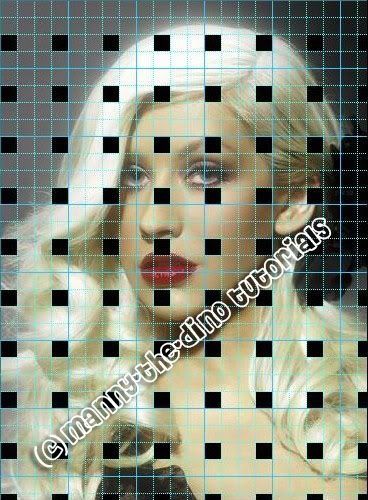
018.Once again, do a ctrl+' to temporarily turn off the grid.
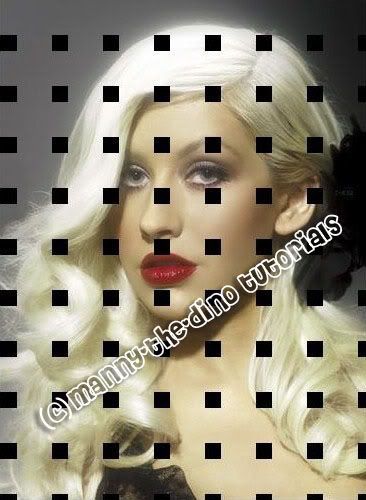
019.Now we need to create the illusion that the strips are weaving above and below each other so hold down the ctrl key and click directly on the "Horizontal Strips" layer's layer mask thumbnail. This will load the horizontal strips back into your image.
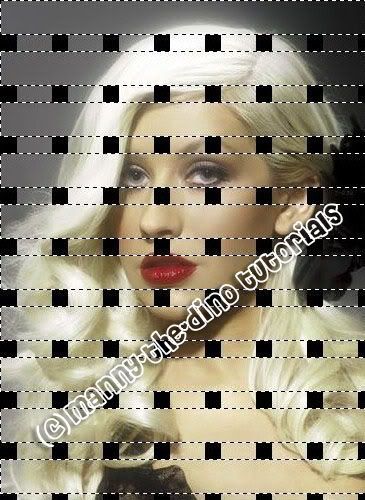
020.Then hold down Shift+Ctrl+Alt and click directly on the "Vertical Strips" layer mask thumbnail. This should cause your picture to look like this:
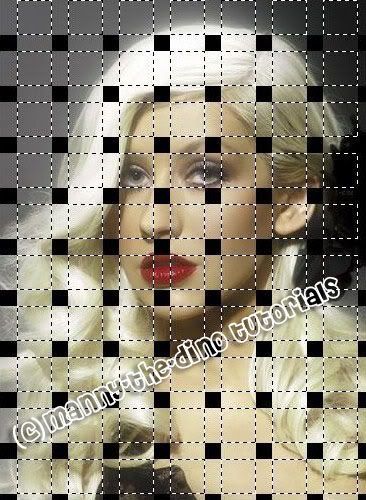
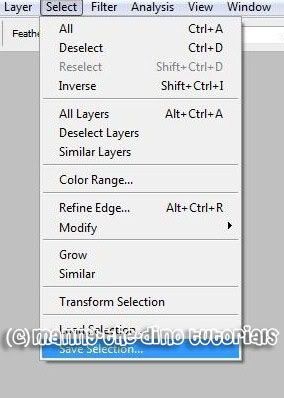
021.Before we go any further, we need to save this selection. To do that, go Select>Save Selection. When the "Save Selection" dialog box appears, just press ok.
022.With your Rectangular Marquee Tool, hold down your Alt key and drag a selection around every other square selection. This will deselect the selections you drag around.
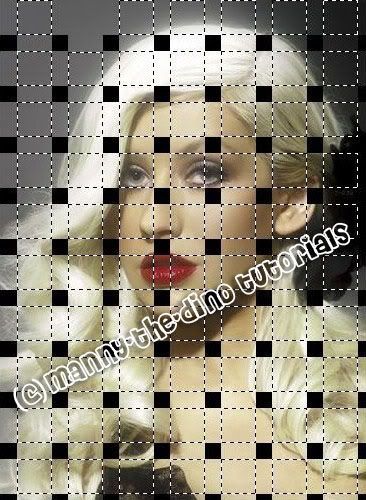
023.Continue dragging around every other square selection to deselect it until only half of the original square selections remain. Your picture should look like this now:
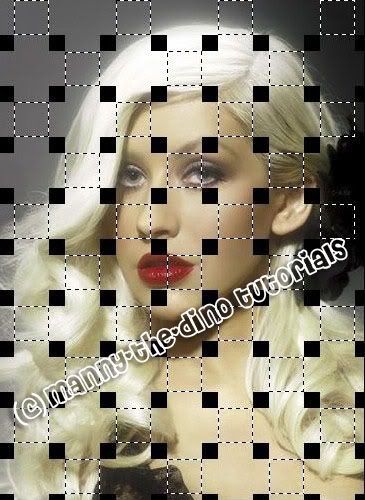
024.Now click on the "Horizontal Strips" layer & do a ctrl+j to copy the selected areas to a new layer.
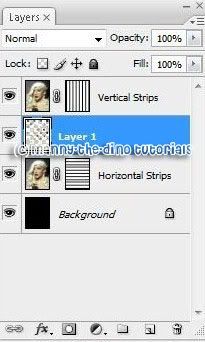
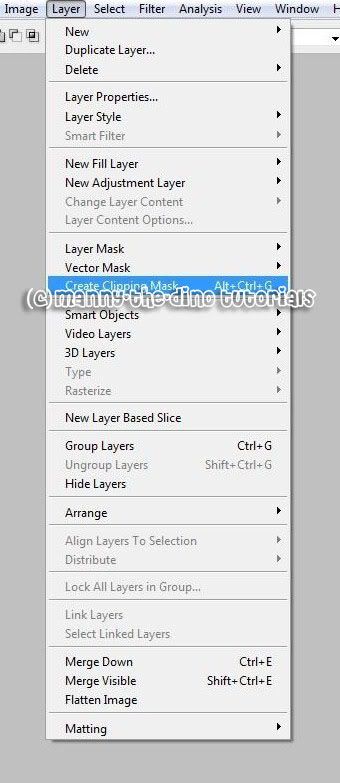
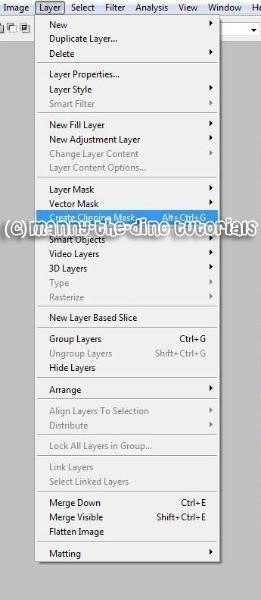
025.Create a clipping mask. To do that, just go Layer>Create Clipping Mask.
026.Now press Ctrl+Alt+4 to bring back our saved selection.
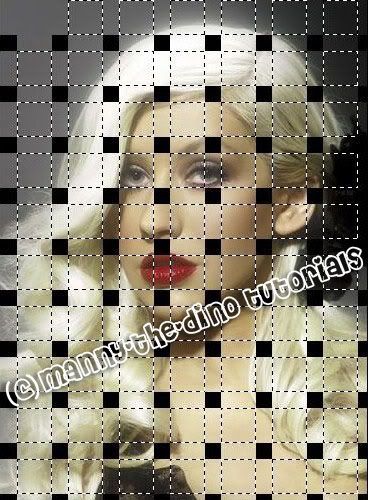
027.With the Rectangular Marquee Tool still selected, once again hold down your Alt key and drag around every other square selection to deselect it. This time though, you want to keep the square selections you deleted the first time we did this and deselect all the ones you kept, so that when you're done, your image looks like this:
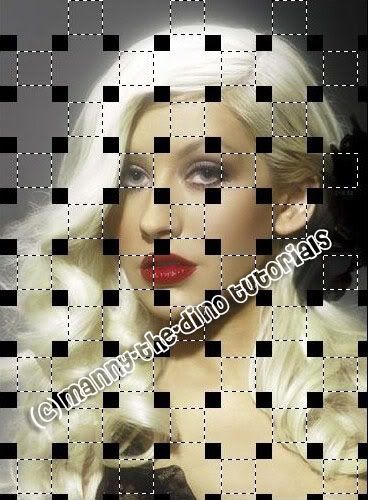
028.Now click on the "Vertical Strips" layer & do a ctrl+j to copy the selected areas to a new layer.
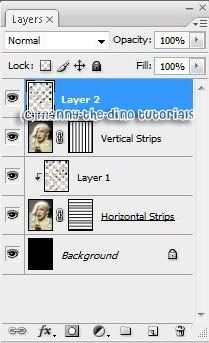
029.And once again, create a clipping mask for the "Vertical Strips" layer. Incase you have short term memory loss & forgot, go Layers>Create Clipping Mask. :D
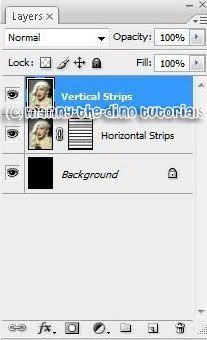
030.Your layers should look like this now:
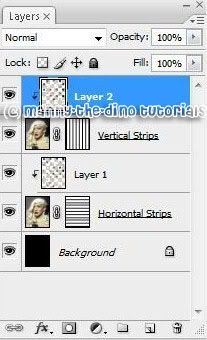
031.With the top layer still selected, click on the Layer Styles icon at the bottom of the Layers palette & click on "Outer Glow."
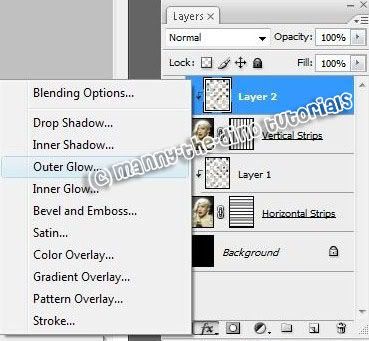
032.When the pop-up appears, apply the following settings:
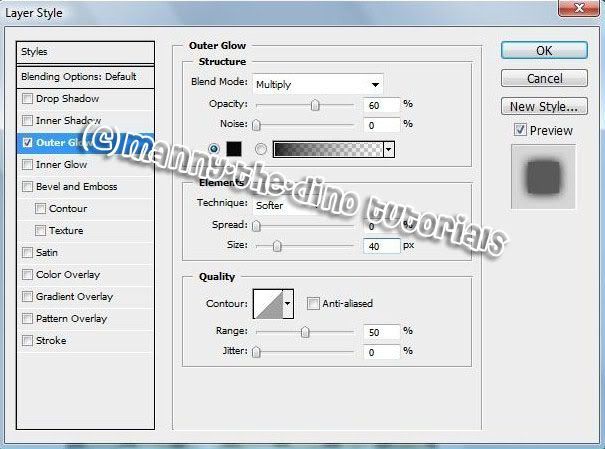
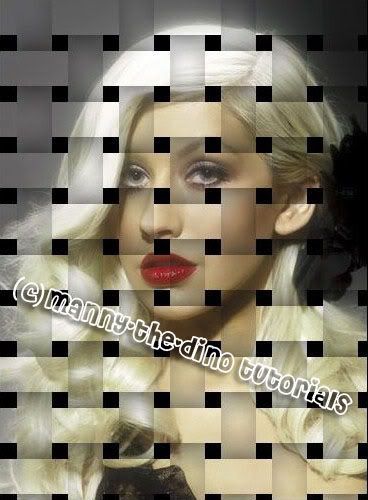
033.Your image should look like this now: [we're almost done. hang in there! :D]
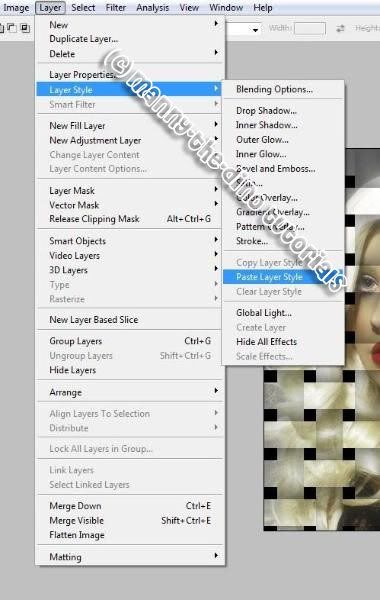
034.We want to do the exact same thing for the other layer so with "Layer 1 "selected, go Layer>Layer Style>Copy Layer Style.
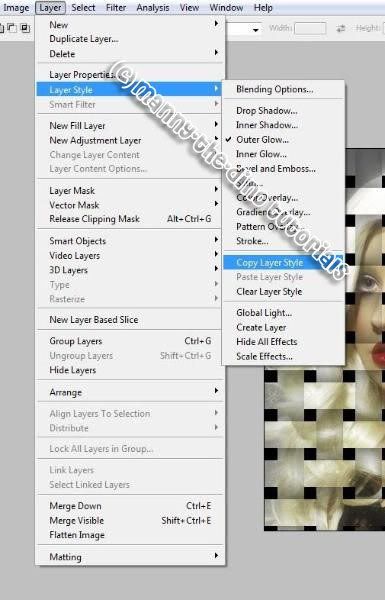
035.Then select "Layer 1" & go Layer>Layer Style>Paste Layer Style.
036.YOU ARE NOW DONE!!!!!!! Your final effect should look like this:
If you got lost or have any questions, comment the tutotial & I'll get back to you as soon as I can. :D
I did this tutorial in Photoshop CS3 Extended which is why some of you may have problems. However, that does't mean this tutorial won't work in other versions of Photoshop. Just try it out.
Want to learn how to make you picture look like as if it was weaved like a basket? Well I will show you how in this tutorial. The tutorial is pretty simple but requires a lot of work, I will admit. I will be using the stunning Christina Aguilera as my subject this time. Here is the before:
Here is the after:
Okay let's start! :)
001.First, open up your picture.
002.Do a ctrl+j twice, making 2 copies of the background layer. Rename the top one "Vertical Strips" & the middle on "Horizontal Strips."
003.Press "D" on your keyboard to reset your FG & BG colors & with your "Background" layer selected, do a atl+backspace. This will fill that layer with black.
004.Now click on the eyeball icon to the left of the "Vertical Strips" layer in the Layers palette to temporarily turn the layer off.
005.Now go View>Show>Grid.
006.A grid will appear on the picture. But don't worry, this can be turned off & on. So don't panic! lol. When your grid appears, if you find that you can't see it very well because the grid color is blending in with the colors of your image, press Ctrl+K to quickly bring up Photoshop's Preferences. Apply the following settings:
007.Click Ok & you picture should look like mine. Of course except for the color you choose. :)
008.Now select you Rectangular Marquee Tool (M). We're going to start on the horizontal strips.
009.Firstly, make sure you have your "Horizontal Strips" layer selected. We are going to create the horizontal strips that are two grids high, with one grid row seperating them from each other. If the picture you are using has a person or persons in it, start off by making your first strip on their eyes. That way their eyes show up in the final product. If you have no idea what I mean by that, just look at my screenshot: To make another stip, hold down shift. Do that for all of them.
010.When you're done making all your horizontal strips, your picture should look like this:
011.With your "Horizontal Strips" layer selected, add a layer mask.
012.After that, you picture should look like this:
013.Do a ctrl+' to take off the grids & see how it looks like. Your horizontal strips are now created!
014.Now click on the eye for "Vertical Strips" so it can appear again & so we can do our vertical strips.
015.Make your vertical stips now. Two grids high, with one grid row seperating them from each other. Make sure you hold down shift to make more stips. Otherwise you will just deselect the first strip. Your picture should look like this now:
016.After you're done doing that, select your "Vertical Strips" layer and add a mask layer.
017.Your picture should look like this now:
018.Once again, do a ctrl+' to temporarily turn off the grid.
019.Now we need to create the illusion that the strips are weaving above and below each other so hold down the ctrl key and click directly on the "Horizontal Strips" layer's layer mask thumbnail. This will load the horizontal strips back into your image.
020.Then hold down Shift+Ctrl+Alt and click directly on the "Vertical Strips" layer mask thumbnail. This should cause your picture to look like this:
021.Before we go any further, we need to save this selection. To do that, go Select>Save Selection. When the "Save Selection" dialog box appears, just press ok.
022.With your Rectangular Marquee Tool, hold down your Alt key and drag a selection around every other square selection. This will deselect the selections you drag around.
023.Continue dragging around every other square selection to deselect it until only half of the original square selections remain. Your picture should look like this now:
024.Now click on the "Horizontal Strips" layer & do a ctrl+j to copy the selected areas to a new layer.
025.Create a clipping mask. To do that, just go Layer>Create Clipping Mask.
026.Now press Ctrl+Alt+4 to bring back our saved selection.
027.With the Rectangular Marquee Tool still selected, once again hold down your Alt key and drag around every other square selection to deselect it. This time though, you want to keep the square selections you deleted the first time we did this and deselect all the ones you kept, so that when you're done, your image looks like this:
028.Now click on the "Vertical Strips" layer & do a ctrl+j to copy the selected areas to a new layer.
029.And once again, create a clipping mask for the "Vertical Strips" layer. Incase you have short term memory loss & forgot, go Layers>Create Clipping Mask. :D
030.Your layers should look like this now:
031.With the top layer still selected, click on the Layer Styles icon at the bottom of the Layers palette & click on "Outer Glow."
032.When the pop-up appears, apply the following settings:
033.Your image should look like this now: [we're almost done. hang in there! :D]
034.We want to do the exact same thing for the other layer so with "Layer 1 "selected, go Layer>Layer Style>Copy Layer Style.
035.Then select "Layer 1" & go Layer>Layer Style>Paste Layer Style.
036.YOU ARE NOW DONE!!!!!!! Your final effect should look like this:
If you got lost or have any questions, comment the tutotial & I'll get back to you as soon as I can. :D
Tutorial Comments
Showing latest 8 of 8 comments

Nevermind.
i did it! YESS!!!
By MiissYER on Apr 25, 2009 2:50 am
why can't i do the squares on step 22?
By MiissYER on Apr 25, 2009 2:33 am
nice, but mines didn't turn out right like yours.
and i had a feeling i followed every step.
By MiissYER on Apr 20, 2009 2:37 am

Gah photoshop. Any tutorials for GIMP?
By heyo-captain-jack on Jan 26, 2008 2:51 am

this creates a beautiful effect
By crimsonsorrow on Oct 19, 2007 4:28 pm

OMG! It worked perfectly! Great tutorial!!!!
By BlackHeart89 on Oct 16, 2007 11:59 pm

awesome..imma try it!
do you by any chance know how to make a tutorial like you know how myspace layout people have a picture of a celebrity and make it all nice..idk how to send u a sample.so you can see it.
By cherrygen on Oct 11, 2007 4:29 pm

lost at number 11. How would you do this in PS CS3?? or do you know? im srry i ask you all these questions...
By PurpleRobotsAttack on Oct 10, 2007 10:01 am
Tutorial Details
| Author |
manny-the-dino

|
| Submitted on | Oct 10, 2007 |
| Page views | 27,536 |
| Favorites | 62 |
| Comments | 8 |
| Reviewer |
IVIike
|
| Approved on | Oct 10, 2007 |