
Tutorial
Click on thumbnailed images to enlarge
[big]go to file - open & choose you're picture[/big]

^ go to filter - then color - then color layer
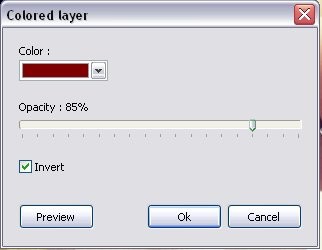
^ NEXTT make you're setting's just like mine above than click okay

^ thann go to adjust and brightness/contrast and make setting's like mine
^ go to filter - then color - then color layer
^ NEXTT make you're setting's just like mine above than click okay
^ thann go to adjust and brightness/contrast and make setting's like mine
Tutorial Comments
Showing latest 5 of 5 comments

Cool. I like it. (:
Thanks! ;D
By Mercyy on Apr 8, 2009 10:25 pm

love coloring with this method :).
especially with blueee shades at a light opacity.
By modsplsdelete on Feb 16, 2009 2:07 am

i like it. thnx
By katheebee94 on Feb 15, 2009 4:48 am

I'm actually rather fond of coloring like this.
If I still had PF, I'd totally try it out. ;D
By so-sarcastic on Feb 15, 2009 2:42 am

eh, to be honest i don't like it. Too dark
By Tomates on Feb 13, 2009 3:50 am
Tutorial Details
| Author |
dominationtutorials

|
| Submitted on | Feb 9, 2009 |
| Page views | 11,496 |
| Favorites | 37 |
| Comments | 5 |
| Reviewer |
manny-the-dino
|
| Approved on | Feb 12, 2009 |