how to make a layout |
  |

 Jun 16 2006, 01:16 PM Jun 16 2006, 01:16 PM
Post
#1
|
|
|
Senior Member  Group: Member Posts: 32 Joined: Oct 2005 Member No: 255,653  |
every one says don't ask how to make a layout. but this is just a couple of questions. nd i kind of know how. but you see...what i do is ask permission from my friends and use their layouts but kind of make it my own. if tht makes sense. but i want to actually start from scratch. and i still kind of dont know how to make a layout from scratch. i dont get how you put a picture in the "extended network" section of your profile. and how toget a background image. but i basically understand DIV overlay and all that. but its the rest that confuses me. if anyone can help it would be grreatly appreciated! thanks! =]]
|
|
|
|




| *This Confession* |
Jun 16 2006, 01:18 PM
Post
#2
|
|
Guest |
|
|
|
|
|
Jun 16 2006, 01:31 PM
Post
#3
|
|
|
Senior Member Group: Member Posts: 32 Joined: Oct 2005 Member No: 255,653 |
do you know how long it usually takes to make a layout?
|
|
|
|
| *This Confession* |
Jun 16 2006, 01:32 PM
Post
#4
|
|
Guest |
ehm ive been doing stuff like this for a while
it takes me about 5 min and 15 min? to make something on my own profile. click the image in my signature to see. I mean since your beginner idk about 30 min to a hour i mean Thats not exact some people it takes days. |
|
|
|
|
Jun 16 2006, 01:38 PM
Post
#5
|
|
|
Senior Member Group: Member Posts: 32 Joined: Oct 2005 Member No: 255,653 |
ugg this stuff is killin meh
ok so i went to the site and tried it but i kind of want a layout like this http://profile.myspace.com/index.cfm?fusea...iendid=85924325 or do you hink that would be too complicated for a beginner |
|
|
|
| *This Confession* |
Jun 16 2006, 02:06 PM
Post
#6
|
|
Guest |
that profile is private
so i can't see it can you take a screen shot? and if you don't know what that is nevermind. |
|
|
|
|
Jun 16 2006, 02:08 PM
Post
#7
|
|
|
Senior Member Group: Member Posts: 32 Joined: Oct 2005 Member No: 255,653 |
yah i know what that is hold on
|
|
|
|
| *This Confession* |
Jun 16 2006, 02:08 PM
Post
#8
|
|
Guest |
k

|
|
|
|
|
Jun 16 2006, 02:10 PM
Post
#9
|
|
|
Senior Member Group: Member Posts: 32 Joined: Oct 2005 Member No: 255,653 |
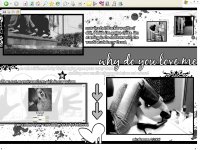
here it is!!=]]
|
|
|
|
| *This Confession* |
Jun 16 2006, 02:11 PM
Post
#10
|
|
Guest |
yea
thats a div overlay i doubt your going to be able to make one of those and you don't even know how to make a normal profile 0_o although heres a tutorial.. http://www.createblog.com/forums/index.php?showtopic=97397 if you want to make a simple div overlay there are generators theres one at this bbz place i think its http://www.bzzspace.com or something like that if not go on google and search bbz div generator |
|
|
|
|
Jun 16 2006, 02:21 PM
Post
#11
|
|
|
Senior Member Group: Member Posts: 32 Joined: Oct 2005 Member No: 255,653 |
i kinda know how to makee it
but 2 more questions 1. when you make a regular profile then how do you put a pic in the "extended network part? 2.i dont understand how to make the pix in thee background just like the one i just showed you do you go to paintshop or something? |
|
|
|
| *This Confession* |
Jun 16 2006, 02:25 PM
Post
#12
|
|
Guest |
1.
CODE <style type="text/css"> table table table td {vertical-align:top ! important;} span.blacktext12 { visibility:visible !important; background-color:transparent; background-image:url("IMAGE URL"); background-repeat:no-repeat; background-position:center center; font-size:0px; letter-spacing:-0.5px; width:WIDTHpx; height:HEIGHTpx; display:block !important; } span.blacktext12 img {display:none;} </style> 2. I use photoshop, most people do. And to insert a background image use this.. CODE <style type=text/css>
body { background-color: ###### background-image: url(""); background-position: bottom right; background-repeat: no-repeat; background-attachment: fixed;</style> |
|
|
|
|
Jun 16 2006, 09:00 PM
Post
#13
|
|
|
Senior Member Group: Member Posts: 32 Joined: Oct 2005 Member No: 255,653 |
so what??
i just upload the panitshop thing onto photobucket or an image uploader? or does it arlready have a URL |
|
|
|
| *This Confession* |
Jun 16 2006, 10:12 PM
Post
#14
|
|
Guest |
don't upload it at photobucket
it resizes the images upload it at http://www.imageshack.us and the last thing is the url..for the picture. |
|
|
|
|
1 User(s) are reading this topic (1 Guests and 0 Anonymous Users)
0 Members: