How to export outline view in Illustrator? |
  |

 Apr 19 2009, 01:04 AM Apr 19 2009, 01:04 AM
Post
#1
|
|
 Senior Member  Group: Staff Alumni Posts: 1,815 Joined: Jun 2006 Member No: 423,396  |
Just installed Illustrator earlier today. Decided to load up a vector I've been working on in Photoshop into Illustrator. Just wondering how to export the outline view? I tried setting it in outline mode, and then exporting it, but it just exported the regular image.
/noob |
|
|
|


|
Apr 22 2009, 10:24 PM
Post
#2
|
|
|
Senior Member Group: Staff Alumni Posts: 1,815 Joined: Jun 2006 Member No: 423,396 |
HIIIIIIIIIIIIIIIIIIIIIIIIIIIIIIIIIIIIIIIIIIIIIII. :[
|
|
|
|
|
Apr 22 2009, 11:04 PM
Post
#3
|
|
 I'm Jc Group: Mentor Posts: 13,619 Joined: Jul 2006 Member No: 437,556 |
can you explain it again differently
 i can't visualize what you're trying to do, even though i don't know that i'll know anyway. i can't visualize what you're trying to do, even though i don't know that i'll know anyway.
|
|
|
|

|
Apr 22 2009, 11:14 PM
Post
#4
|
|
 in a matter of time Group: Staff Alumni Posts: 7,151 Joined: Aug 2005 Member No: 191,357 |
Mark I think you'd do better to re-ask your question in a subforum with more traffic, or PM some people you've seen that have done this. Or ask in a more specialized graphic design forum hahaha.
|
|
|
|


|
Apr 23 2009, 12:05 AM
Post
#5
|
|
|
Senior Member Group: Staff Alumni Posts: 1,815 Joined: Jun 2006 Member No: 423,396 |
Haha, well basically, what Melissa did for her Ironman vector:
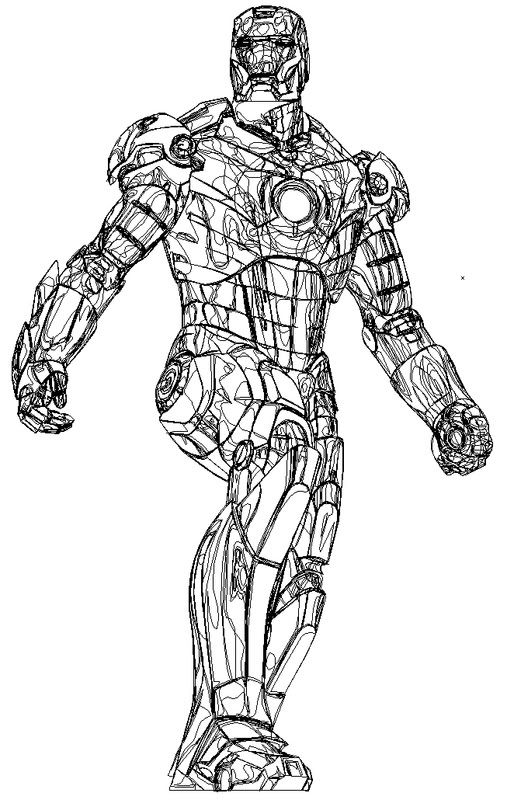 In Illustrator, when you go to View > Outline View, all your paths show up like this. Problem is, when I do enable Outline View (or "Mode," I forget) and try to export the image like this, it ends up exporting the image in normal view.. |
|
|
|
|
Apr 23 2009, 12:05 AM
Post
#6
|
|
 show me a garden thats bursting to life Group: Staff Alumni Posts: 12,303 Joined: Mar 2005 Member No: 115,987 |
You totally posted when I did. Hahaha. |
|
|
|


|
Apr 23 2009, 12:09 AM
Post
#7
|
|
|
Senior Member Group: Staff Alumni Posts: 1,815 Joined: Jun 2006 Member No: 423,396 |
^Haha. Well, I would take a screenshot, but it's really ghetto, and I'm sure there's a real way to do it. XD If my canvas(?) on Illustrator were really big, and I were to take a screenshot of the outline, I'd be limited on size, if you know what I mean.
|
|
|
|
|
Apr 23 2009, 12:12 AM
Post
#8
|
|
|
in a matter of time Group: Staff Alumni Posts: 7,151 Joined: Aug 2005 Member No: 191,357 |
^ You could be REALLY ghetto about it and take screenshots at 100% size, then create a new document and try to put the various screenshots back together like a puzzle XD. Yeah I've done that before. It's actually sort of...fun?
Why don't you just PM Melissa then? |
|
|
|
|
Apr 23 2009, 12:29 AM
Post
#9
|
|
|
show me a garden thats bursting to life Group: Staff Alumni Posts: 12,303 Joined: Mar 2005 Member No: 115,987 |
QUOTE(Markster @ Apr 23 2009, 12:09 AM)  ^Haha. Well, I would take a screenshot, but it's really ghetto, and I'm sure there's a real way to do it. XD If my canvas(?) on Illustrator were really big, and I were to take a screenshot of the outline, I'd be limited on size, if you know what I mean. Oh. Damn. Didn't think about that. Not even in going View >> Fit Onto Screen, Window..something along those lines? But I do get whatcha mean. And Gigi stole my next piece of advice. PM Melissa. |
|
|
|
|
Apr 23 2009, 06:41 AM
Post
#10
|
|
|
I'm Jc Group: Mentor Posts: 13,619 Joined: Jul 2006 Member No: 437,556 |
the problem with view > outline though is that it's not really removing the fill, it's just showing only the stroke, i think. it's not really changing anything other than what you see on the screen, it's not changing the actual image. pretty much everything under the "view" menu in illustrator only has to do with how you're viewing it within the program, you know? toggling from one to the other.
that's confusing, and not really helpful. i do'nt know homie maybe melissa can shed some light on what she did to get her ironman. QUOTE(Gigi @ Apr 23 2009, 12:12 AM) ^ You could be REALLY ghetto about it and take screenshots at 100% size, then create a new document and try to put the various screenshots back together like a puzzle XD. Yeah I've done that before. It's actually sort of...fun? 
|
|
|
|
|
Apr 23 2009, 09:25 PM
Post
#11
|
|
 ‹(. .)› Group: Official Member Posts: 2,367 Joined: Jun 2004 Member No: 20,089 |
i usually use 1pt black stroke with transparent shape and just save that.
|
|
|
|

|
3 User(s) are reading this topic (3 Guests and 0 Anonymous Users)
0 Members: