Images wont match up, both imges are saved as .png |
  |

 Apr 16 2009, 04:40 PM Apr 16 2009, 04:40 PM
Post
#1
|
|
 Sex, Blood, & RocknRoll  Group: People Staff Posts: 5,305 Joined: Nov 2007 Member No: 596,480  |
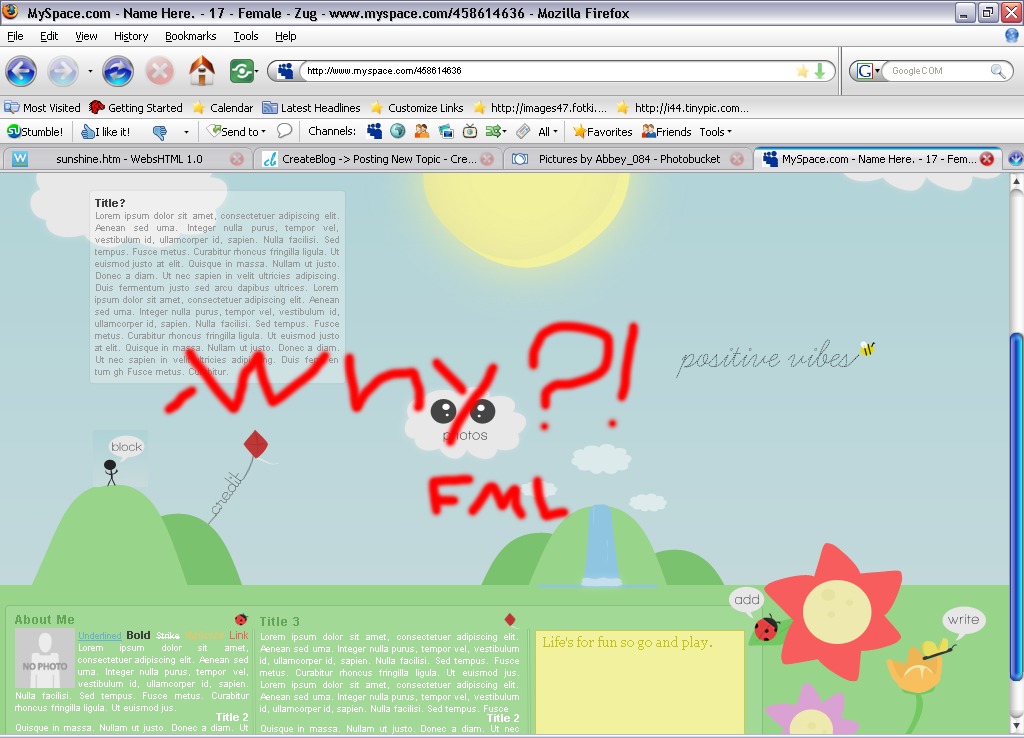
both images are saved as .png, but the one image has color issues going on. I'm I missing something? |
|
|
|



|
Apr 16 2009, 05:03 PM
Post
#2
|
|
 Senior Member Group: Administrator Posts: 8,629 Joined: Jan 2007 Member No: 498,468 |
Oh I see it now. I was like wtf is she talking about? haha
But maybe you edited the little person differently. Looks like there's a gradient behind him. |
|
|
|

|
Apr 16 2009, 05:40 PM
Post
#3
|
|
 Mel Blanc was allergic to carrots. Group: Official Designer Posts: 6,371 Joined: Aug 2008 Member No: 676,291 |
^Yeah, maybe you should make the background for the little guy transparent.

|
|
|
|


|
Apr 16 2009, 06:10 PM
Post
#4
|
|
 Senior Member Group: Staff Alumni Posts: 2,435 Joined: Feb 2007 Member No: 506,205 |
Did you cut him out of the image from that exact spot?
|
|
|
|

|
Apr 16 2009, 08:00 PM
Post
#5
|
|
|
Sex, Blood, & RocknRoll Group: People Staff Posts: 5,305 Joined: Nov 2007 Member No: 596,480 |
Yeah, I did everything I regularly do with rollovers.
I will try to save it as a transparent background, but I would still like to know why it wouldn't match up. lol |
|
|
|
|
Apr 17 2009, 05:45 PM
Post
#6
|
|
|
Senior Member Group: Staff Alumni Posts: 2,435 Joined: Feb 2007 Member No: 506,205 |
Maybe you just screwed up something minor...you know, pressed a weird key or whatever. Did you try it again?
|
|
|
|
|
Apr 17 2009, 06:09 PM
Post
#7
|
|
|
Mel Blanc was allergic to carrots. Group: Official Designer Posts: 6,371 Joined: Aug 2008 Member No: 676,291 |
Or maybe sometimes when you crop things out, if you have settings (such as a gradient overlay), it'll adjust to the image's new proportions.
You did crop him right? or did you just make a selection around him, pressed CTRL+C, went to File>New, and then made a new document and pasted him in there? 
|
|
|
|
|
Apr 17 2009, 10:01 PM
Post
#8
|
|
|
Mel Blanc was allergic to carrots. Group: Official Designer Posts: 6,371 Joined: Aug 2008 Member No: 676,291 |
^Don't you have a tutorial for that?
|
|
|
|
|
Apr 18 2009, 10:27 AM
Post
#9
|
|
|
Sex, Blood, & RocknRoll Group: People Staff Posts: 5,305 Joined: Nov 2007 Member No: 596,480 |
QUOTE(schizo @ Apr 17 2009, 05:45 PM)  Maybe you just screwed up something minor...you know, pressed a weird key or whatever. Did you try it again? Yeah, I think I must of hit something that messed with the opacity of cropped images. I am making another layout so I'll see if maybe it will only do it with that file and not this one. QUOTE(A1Bassline @ Apr 17 2009, 08:18 PM) You should start slicing your images, Abbey. Like, if you slice them, you won't have that problem and I can hook you up with a code for rollovers. It's really simple. Like you'll have the original image as one whole image and then the sliced image exactly over it and then the code I have makes the image behind show up on hover. That would be sweet.  Thanks for the ideas too, Mike. |
|
|
|
|
Apr 18 2009, 01:57 PM
Post
#10
|
|
|
Sex, Blood, & RocknRoll Group: People Staff Posts: 5,305 Joined: Nov 2007 Member No: 596,480 |
So will there be one of those code for each rollover?
|
|
|
|
|
Apr 18 2009, 02:05 PM
Post
#11
|
|
|
Sex, Blood, & RocknRoll Group: People Staff Posts: 5,305 Joined: Nov 2007 Member No: 596,480 |
niiiice. I'll try it out later on tonight.
|
|
|
|
|
Apr 18 2009, 03:00 PM
Post
#12
|
|
|
Mel Blanc was allergic to carrots. Group: Official Designer Posts: 6,371 Joined: Aug 2008 Member No: 676,291 |
Oh, but TJ, that rollover code doesn't work in IE.

|
|
|
|
|
Apr 18 2009, 03:14 PM
Post
#13
|
|
|
Mel Blanc was allergic to carrots. Group: Official Designer Posts: 6,371 Joined: Aug 2008 Member No: 676,291 |
Well, for some reason it wouldn't work for me. Oh well.
|
|
|
|
|
Apr 18 2009, 08:25 PM
Post
#14
|
|
|
Sex, Blood, & RocknRoll Group: People Staff Posts: 5,305 Joined: Nov 2007 Member No: 596,480 |
Ok, I am confused on where I am putting the original image and the image with the rollovers
|
|
|
|
|
Apr 18 2009, 08:57 PM
Post
#15
|
|
|
Sex, Blood, & RocknRoll Group: People Staff Posts: 5,305 Joined: Nov 2007 Member No: 596,480 |
Ok, this is probably a stupid question, but how do I save a sliced image? Do I go to save for web & Devices
|
|
|
|
|
Apr 18 2009, 08:58 PM
Post
#16
|
|
 Senior Member Group: Official Member Posts: 2,936 Joined: Sep 2008 Member No: 683,235 |
^Yupp.
|
|
|
|

|
Apr 18 2009, 09:21 PM
Post
#17
|
|
|
Sex, Blood, & RocknRoll Group: People Staff Posts: 5,305 Joined: Nov 2007 Member No: 596,480 |
O, I feel way more than stupid right now lol. Thanks for helping me TJ. Ok after I save it what do I do?
|
|
|
|
|
Apr 18 2009, 09:32 PM
Post
#18
|
|
|
Sex, Blood, & RocknRoll Group: People Staff Posts: 5,305 Joined: Nov 2007 Member No: 596,480 |
So I upload all the images and replace the image source urls in the code
|
|
|
|
|
Apr 18 2009, 09:46 PM
Post
#19
|
|
|
Sex, Blood, & RocknRoll Group: People Staff Posts: 5,305 Joined: Nov 2007 Member No: 596,480 |
the images are moving

|
|
|
|
|
Apr 19 2009, 08:18 AM
Post
#20
|
|
|
I'm Luke Group: Member Posts: 96 Joined: Mar 2009 Member No: 718,950 |
I'm not sure if you already did this, but if you right click on the slice, it will bring up a little box where you can tell it to make it a link, I think that's what you're doing, but just wanted to throw that out there
|
|
|
|

|
Apr 19 2009, 04:08 PM
Post
#21
|
|
|
Senior Member Group: Member Posts: 1,237 Joined: May 2008 Member No: 648,123 |
just a question on how you were originally doing it...did you save them as 8-bit PNG or 24-bit? 8-bit coloring works exactly like GIF compression, so that might be part of the problem. also, it looks like it's just not properly aligned (it's a bit off on top of the hill) and that could be messing with the gradient of the sky.
|
|
|
|

|
Apr 19 2009, 04:16 PM
Post
#22
|
|
|
Sex, Blood, & RocknRoll Group: People Staff Posts: 5,305 Joined: Nov 2007 Member No: 596,480 |
I will check the bit thing, but I know it isn't aliment because the colors are way to off for it to just be miss aligned a pixel or 2.
|
|
|
|
|
2 User(s) are reading this topic (2 Guests and 0 Anonymous Users)
0 Members: