Trouble with MiniDisc Player... |
  |

 Oct 16 2006, 07:17 AM Oct 16 2006, 07:17 AM
Post
#1
|
|
 Senior Member  Group: Member Posts: 840 Joined: Dec 2004 Member No: 73,927  |
I have the AIWA AM-F90 Minidisc Player.
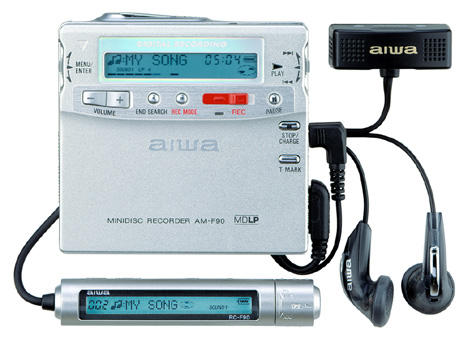 A few days ago I started having problems, it started erasing everything on my Minidisc... Listening to the existing songs on my Minidiscs is no problem. I can still do that. But when I finished recording a song on it, it then turns off automatically after a while coz I haven't used it. But when I turn it back on & try to play the music, it says "BLANKDISC"! It seemed to have erased everything on it. 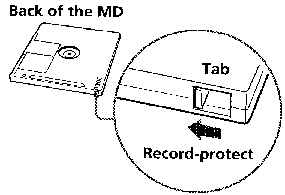 I've tried recording the song, & then when it turns off I take the disc out & put it on "Recorded material is protected" mode. (at the back of the MiniDisc itself there's a tab, I put it on Protect mode) It still gets erased... Have I accidently pressed a button that caused it to do this or is it broken?!?!?! I looked in the manual & can't seem to find anything that can fix it...... |
|
|
|


|
Oct 16 2006, 11:06 AM
Post
#2
|
|
 cheeeesy like theres no tomorrow Group: Member Posts: 3,316 Joined: Aug 2004 Member No: 37,142 |
i used to have a mini disc player also and it had a lot of problems, i think it was basically cause it fell so many times.
but for your problem um i am guessing that it is coming from your program, you might have an option to reset all the songs so i guess it deletes itself after you plug it to you computer. what program came with it sony jukebox? |
|
|
|

|
Oct 16 2006, 11:11 AM
Post
#3
|
|
 Trinie loves you Group: Member Posts: 1,003 Joined: Sep 2006 Member No: 464,831 |
it could be ur program or it could also be ur disc.
|
|
|
|

|
Oct 18 2006, 01:08 AM
Post
#4
|
|
|
Senior Member Group: Member Posts: 840 Joined: Dec 2004 Member No: 73,927 |
My Minidisc didn't come with any program but a cable that i plug to my MD player & to the speaker, I basically recorded music or in other words "sounds" that came out of my computer speakers....
I don't think its the cable's problem because I was listening to music on the bus, I then tried to erase the very last song on the MD, & then it just went nuts & erased all my songs on the disc.... ^_^" I thought it was probably a setting I accidently pressed whilst I was listening on my MD but I can't seem to find out what setting I accidently pressed.... I don't think its the disc's problem, I tried several different branded ones of mine & it still erased the whole disc after I had finished recording a song & it automatically turned off. |
|
|
|
|
Oct 18 2006, 03:25 PM
Post
#5
|
|
 cB Assassin Group: Official Member Posts: 10,147 Joined: Mar 2004 Member No: 7,672 |
Just get a flash based MP3 player, problem solved...
|
|
|
|


|
2 User(s) are reading this topic (2 Guests and 0 Anonymous Users)
0 Members: