layout help, =) |

| *waze* |
 Apr 12 2006, 05:36 AM
Post
#1
|
|
Guest  |
hey i used this layout for my pg. and when i went to paste it, it didn't show my friends or any of my comments. it left the whole bottom off?
but in the preview of this layout it SHOWS the FRIENDS and COMMENTS. anyone know why? here's the layout and code... u can try it on urs, maybe it does the same thing, or i don't know if it's just my pg. how do i fix it? 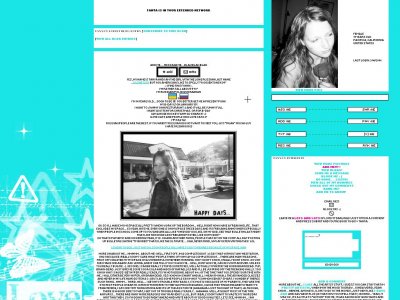 Layout made by <a href="http://www.createblog.com/layouts/index.php?author_id=136554" title="More layouts by this person">tanichick</a> at <a href="http://www.createblog.com/layouts/index.php?type_id=3" title="More Myspace layouts">CreateBlog.com</a>.<style>/* myspace codes provided by createblog.com */</style> <style type="text/css">.comments {visibility:hidden;display:none;}</style> <style type="text/css"> a.text, table div font a, table div div {visibility:hidden;} table table div font a, table table div div {visibility:visible;} </style> <style>.blacktext10{DISPLAY:NONE;VISIBILITY:HIDDEN;}</style> <STYLE> a:hover img {filter: progid:DXImageTransform.Microsoft.Pixelate(maxsquare=4);} </STYLE> <style type="text/css"> table {direction:rtl;} table table table {direction:ltr;} </style> <style type="text/css"> C{ This contact table code was generated at http://r4wr.com/ct } .contactTable { width:300px !important; height:150px !important; padding:0px !important; background-image:url(http://layouts.cbimg7.com/19/9503c.gif); background-attachment:scroll; background-position:center center; background-repeat:no-repeat; background-color:transparent;} .contactTable table, table.contactTable td { padding:0px !important; border:0px; background-color:transparent; background-image:none;} .contactTable a img {visibility:hidden; border:0px !important;} .contactTable a {display:block; height:28px; width:115px;} .contactTable .text {font-size:1px !important;} .contactTable .text, .contactTable a, .contactTable img {filter:none !important;} .contactTable .whitetext12 {display:none;}C{ Original Coding by Mrk - BBZ - www.myspace.com/contacttables } </style> <style> body table tr table tr td.text table tr td.text table tr td table tr td img {width:100px;} body table tr table tr td.text table tr td.text table tr td table tr td div img {width:80px; height:20px;} body table tr table tr td.text table tr td.text table tr td table tr td a img {width:auto; height:auto;} </style> <style type="text/css"> .blogbody u, .standard u, p u, u { font-weight: underline; color: 19E5E6;} </style> <style type="text/css"> .r{} body { background-color:19E5E6; background-position:bottom left; background-repeat:no-repeat; background-attachment:fixed; background-image:url('http://layouts.cbimg7.com/19/9503d.jpg') } body { scrollbar-face-color:19E5E6; scrollbar-highlight-color:19E5E6; scrollbar-3dlight-color:19E5E6; scrollbar-darkshadow-color:19E5E6; scrollbar-shadow-color:19E5E6; scrollbar-arrow-color:ffffff; scrollbar-track-color:ffffff; } Body {border-width:; border-color:; border-style:; } table, tr, td {background:transparent; border:0px;} table table table {background-color:ffffff; } table table table { border-width:px; border-color:; border-style:solid; } table table table table {border:0px;} table table table {background-image:url();} .orangetext15 { DISPLAY:NONE; VISIBILITY:HIDDEN } a:link img { filter: gray; } a:hover img { filter: none; } input {background-color:transparent !important;} td, span, div, input, a, table td div div font, body div table tbody tr td font {font-family: small fonts !important; font-size: 7.5px !important; text-transform: uppercase !important; } td, span, div, input, table td div div font, body div table tbody tr td font {color:000000!important;font-size: } .nametext, .whitetext12, .lightbluetext8, .orangetext15, .blacktext12, .redtext, .redbtext, .blacktext10, .btext {color:000000!important; font-family: georgia !important; font-size:10px} a {color:19E5E6!important; text-decoration: !important; font-style: !important; font-weight: !important; text-transform: !important; } a.navbar:hover{color:white; font-weight:bold;background-image:url();} body{cursor: crosshair} a:hover{cursor: crosshair} </style> <style>/* myspace codes provided by createblog.com */</style> |
|
|
|

Posts in this topic
 waze layout help Apr 12 2006, 05:36 AM
 waze anyone? Apr 13 2006, 10:15 PM This Confession whats in your who id like to meet part?
because e... Apr 13 2006, 10:20 PM
 toyo loco ^
QUOTEbut in the preview of this layout it SHOWS ... Apr 13 2006, 10:53 PM
  |
1 User(s) are reading this topic (1 Guests and 0 Anonymous Users)
0 Members: