Friggin' Pen Tool! D8<, I'm having issues with a certain effect. |

 Aug 16 2008, 07:45 PM Aug 16 2008, 07:45 PM
Post
#1
|
|
 i like boobies, yes I do. I like boobies - how 'bout you?  Group: Member Posts: 620 Joined: Jun 2008 Member No: 662,457  |
Makes me...SO MAD!!! Not drawing with it, that's not the problem. My issue is trying to stroke the path to get it to do the fade thing on the ends, like the picture below.
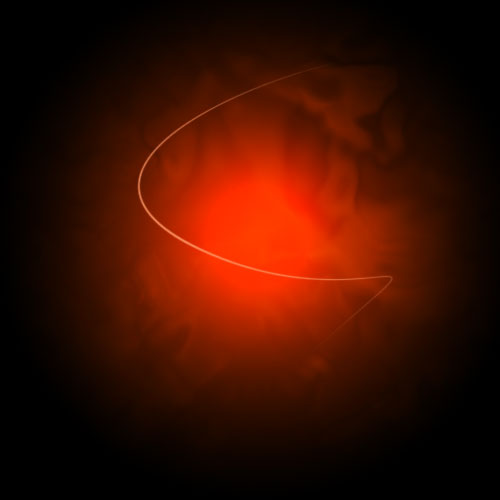 For me it always only fades one end! I've read and reread at least ten tutorials, glossed over more, messed around with Shape Dynamics (Fade, Minimum Diameter, etc) and I'm about to shoot PS in the face. Even if I tick Simulate Pressure, it just fades the one end. I just want to figure out what the hell the issue is so I can stop being so mad at it before I really do shoot it in the face! >.< By the way, I'm using CS3 Extended, if that makes any difference. |
|
|
|


 |
Replies
|
Aug 17 2008, 10:34 AM
Post
#2
|
|
 AKA RockIt Studios Group: Official Member Posts: 2,286 Joined: Jun 2006 Member No: 421,809 |
your problem is that your first control on shape dynamics is fade. this only fades it to one side. :]
you need to change it to pen pressure. you can play around with the minimum diameter below it to change how much it "dissapears" towards the end. the lower the number, the more it will fade. the higher the number, the less it will fade. |
|
|
|

|
Aug 17 2008, 03:24 PM
Post
#3
|
|
|
i like boobies, yes I do. I like boobies - how 'bout you? Group: Member Posts: 620 Joined: Jun 2008 Member No: 662,457 |
QUOTE(RockItStudios @ Aug 17 2008, 10:34 AM)  you need to change it to pen pressure. Thank you!  It woiked! It woiked!I guess I just never tried it because I thought you'd need a tablet, which I haven't got. Anyway, thanks all! :] |
|
|
|
Posts in this topic
 HeartOfPandora Friggin' Pen Tool! D8< Aug 16 2008, 07:45 PM
 rockguy it always works for me Aug 16 2008, 09:51 PM technicolour Hm, what brush setting do you have it set to? Aug 16 2008, 09:53 PM
 HeartOfPandora QUOTE(technicolour @ Aug 16 2008, 09:53 P... Aug 16 2008, 11:33 PM technicolour Can you take a screenshot of your program w/ all t... Aug 16 2008, 11:35 PM HeartOfPandora These are the brush settings, nothing fancy:
click... Aug 16 2008, 11:57 PM technicolour I think it is because you are tinkering with the b... Aug 17 2008, 12:00 AM HeartOfPandora Sorry, apparently it resized. These are full size... Aug 17 2008, 12:00 AM technicolour WHOA. We posted at the same time. Heh. Aug 17 2008, 12:00 AM HeartOfPandora Haha we did.
Well, I tried turning off the Shape ... Aug 17 2008, 12:03 AM technicolour Hm. You have it on the Subtraction pen tool settin... Aug 17 2008, 12:30 AM rockguy hold on is this what your doin:
draw the line with... Aug 17 2008, 12:32 AM schizo Topic closed and moved to Resolved. Aug 17 2008, 04:59 PM
HeartOfPandora QUOTE(technicolour @ Aug 16 2008, 09:53 P... Aug 16 2008, 11:33 PM technicolour Can you take a screenshot of your program w/ all t... Aug 16 2008, 11:35 PM HeartOfPandora These are the brush settings, nothing fancy:
click... Aug 16 2008, 11:57 PM technicolour I think it is because you are tinkering with the b... Aug 17 2008, 12:00 AM HeartOfPandora Sorry, apparently it resized. These are full size... Aug 17 2008, 12:00 AM technicolour WHOA. We posted at the same time. Heh. Aug 17 2008, 12:00 AM HeartOfPandora Haha we did.
Well, I tried turning off the Shape ... Aug 17 2008, 12:03 AM technicolour Hm. You have it on the Subtraction pen tool settin... Aug 17 2008, 12:30 AM rockguy hold on is this what your doin:
draw the line with... Aug 17 2008, 12:32 AM schizo Topic closed and moved to Resolved. Aug 17 2008, 04:59 PM |
1 User(s) are reading this topic (1 Guests and 0 Anonymous Users)
0 Members: