Perhaps you know? :), Photoshop effect/tutorial |

 Apr 3 2007, 04:48 PM Apr 3 2007, 04:48 PM
Post
#1
|
|
 Senior Member  Group: Member Posts: 112 Joined: Feb 2006 Member No: 371,402  |
Would anyone have a tutorial or an idea on how to get such an effect on Photoshop?
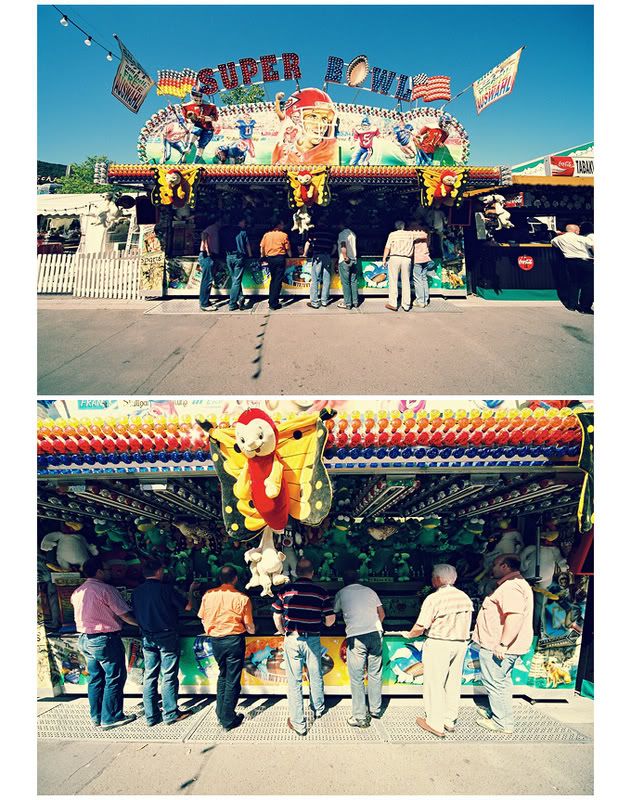 Credit for image. Please & thank you.  Please remember to thumbnail large images, thanks! } Azarel This post has been edited by Azarel: Apr 3 2007, 09:18 PM |
|
|
|




 |
Replies
|
Apr 5 2007, 10:31 AM
Post
#2
|
|
 hardxcore. Group: Member Posts: 1,223 Joined: Nov 2006 Member No: 479,494 |
it's a vintage effect, am i correct?
there are multiple tutorials on this, such as this one. i usually either do one of two things to make it easier. 1. i take a gradient with a yellow/brown color and spread it across my image multiple times at appx. 43% opacity. 2. i take the color filling tool and use at baby pink color at appx. 50% opacity. feel free to expieriment with different opacities and colors. |
|
|
|

|
Apr 5 2007, 11:17 PM
Post
#3
|
|
|
Senior Member Group: Member Posts: 112 Joined: Feb 2006 Member No: 371,402 |
QUOTE(Obscure Enigma @ Apr 5 2007, 11:31 AM)  it's a vintage effect, am i correct? there are multiple tutorials on this, such as this one. i usually either do one of two things to make it easier. 1. i take a gradient with a yellow/brown color and spread it across my image multiple times at appx. 43% opacity. 2. i take the color filling tool and use at baby pink color at appx. 50% opacity. feel free to expieriment with different opacities and colors. Ach thanks so much miss!! Will definitly try it out! And yes thanks for th elink..I do use that effect for other pictures..but maybe I'm crazy with this image I just see something different in the effect.  It's all about experementing though right? Thanks again! It's all about experementing though right? Thanks again! 
|
|
|
|
Posts in this topic
 toxic-candy Perhaps you know? :) Apr 3 2007, 04:48 PM
 Arjuna Capulong I've never tried this particular effect myself... Apr 3 2007, 07:40 PM
 toxic-candy QUOTE(Arjuna Capulong @ Apr 3 2007, 8:40 ... Apr 3 2007, 08:37 PM mona lisa This ought to be it. Make a new layer, fill it wit... Apr 3 2007, 08:45 PM toxic-candy QUOTE(mona lisa @ Apr 3 2007, 9:45 PM) Th... Apr 3 2007, 08:56 PM toyo loco Ok well I'll close this. If you want it open f... Apr 6 2007, 05:07 PM
 |
1 User(s) are reading this topic (1 Guests and 0 Anonymous Users)
0 Members: