Sharpness of Picture |

 Feb 4 2006, 09:55 PM Feb 4 2006, 09:55 PM
Post
#1
|
|
 Senior Member  Group: Member Posts: 112 Joined: Feb 2006 Member No: 371,402  |
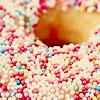
 Like the example I have above, I was wondering if anyone perhaps knew how to make an image look like that (all sharp and so on..)? Is it a filter, or brush or texture on Photoshop? I'm not quite sure, and if so is there any sites I could find it on? Please and thank you!  Also this is my first post on this site and I hope I posted this topic in the right group! Also this is my first post on this site and I hope I posted this topic in the right group! 
|
|
|
|




 |
Replies
|
Feb 4 2006, 10:03 PM
Post
#2
|
|
 i lost weight with Mulder! Group: Official Designer Posts: 4,070 Joined: Jan 2005 Member No: 79,019 |
its not just that.
at the images original size (pre-cropping), go to ... i think its filter - sharpen - unsharp mask - radius: 1. then resize to 100 x 100. filter - sharpen. smooth out the skin, and lightly sharpen the lips and eyes. ive been making icons all day. this is like... built in for me. |
|
|
|

Posts in this topic
 toxic-candy Sharpness of Picture Feb 4 2006, 09:55 PM
 sarcastic biscuit Yep, this is the right forum (: Anyway, to make an... Feb 4 2006, 10:00 PM
 toxic-candy Oh yay! Thanks so much both of you for all yo... Feb 4 2006, 10:10 PM
 |
1 User(s) are reading this topic (1 Guests and 0 Anonymous Users)
0 Members: