Sepia iconing// Light Desaturation?, I really like this icon tone. :3 |

 Mar 21 2009, 06:25 PM Mar 21 2009, 06:25 PM
Post
#1
|
|
 Member  Group: Member Posts: 17 Joined: Mar 2009 Member No: 720,139  |
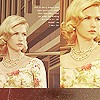
Hello, uhm how do you get this type of picture effect?
( I do have some knowledge of icon colorizing, but I'm still a noob at it.  ) )heres this link: clickies, ty. |
|
|
|


 |
Replies
(1 - 24)
|
Mar 21 2009, 06:55 PM
Post
#2
|
|
 Senior Member Group: Staff Alumni Posts: 2,435 Joined: Feb 2007 Member No: 506,205 |
Maybe try desaturating the image a bit and adding a layer with an army green set to soft light over it. Then add some contrast.
Not sure how well that will work...I haven't actually tested it, but it seems about right. |
|
|
|


|
Mar 21 2009, 06:58 PM
Post
#3
|
|
 Sex, Blood, & RocknRoll Group: People Staff Posts: 5,305 Joined: Nov 2007 Member No: 596,480 |
^That plus add a back and white version of the photo over the colored version and set it to a lower opacity.
|
|
|
|

|
Mar 21 2009, 07:17 PM
Post
#4
|
|
|
Senior Member Group: Member Posts: 1,237 Joined: May 2008 Member No: 648,123 |
if you have photoshop, it's easily done by playing around with saturation and color balance (i'm not familiar with how this works in other programs).
1. press ctrl+u to bring up the hue/saturation window. drop the saturation down to about -50. 2. press ctrl+b to bring up the color balance window. - highlights: +10, 0, 0 - midtones: 0, +10, 0 - shadows: 0, 0, -10 gives you nearly the same coloring. if you need it a little different, just play around with the color balance. |
|
|
|


|
Mar 21 2009, 08:32 PM
Post
#5
|
|
 show me a garden thats bursting to life Group: Staff Alumni Posts: 12,303 Joined: Mar 2005 Member No: 115,987 |
QUOTE(fixtatik @ Mar 21 2009, 07:17 PM)  if you have photoshop, it's easily done by playing around with saturation and color balance (i'm not familiar with how this works in other programs). 1. press ctrl+u to bring up the hue/saturation window. drop the saturation down to about -50. 2. press ctrl+b to bring up the color balance window. - highlights: +10, 0, 0 - midtones: 0, +10, 0 - shadows: 0, 0, -10 gives you nearly the same coloring. if you need it a little different, just play around with the color balance. That would be the simplest thing to do. However, I'll tack on to the other suggestions that try a light yellow/orange color layer and set that to multiply or darken. |
|
|
|

|
Mar 21 2009, 08:59 PM
Post
#6
|
|
|
Member Group: Member Posts: 17 Joined: Mar 2009 Member No: 720,139 |
omg, thnx. :)
& yeah, i use photoshop. i'll try that. i'll post up a picture of my work later to see if it works. n___n |
|
|
|
|
Mar 21 2009, 09:13 PM
Post
#7
|
|
|
Senior Member Group: Member Posts: 1,237 Joined: May 2008 Member No: 648,123 |
QUOTE(technicolour @ Mar 21 2009, 09:32 PM) However, I'll tack on to the other suggestions that try a light yellow/orange color layer and set that to multiply or darken. the color balance levels i put up basically give you the same effect as a yellow/orange layer. |
|
|
|
|
Mar 22 2009, 09:36 AM
Post
#8
|
|
|
Member Group: Member Posts: 17 Joined: Mar 2009 Member No: 720,139 |
hmmm, the desaturating really did help, but then i still really didn't get it.
heres what i did: 
|
|
|
|
|
Mar 22 2009, 02:24 PM
Post
#9
|
|
|
show me a garden thats bursting to life Group: Staff Alumni Posts: 12,303 Joined: Mar 2005 Member No: 115,987 |
Hm, what all did you do for that picture?
|
|
|
|
|
Mar 22 2009, 03:56 PM
Post
#10
|
|
|
Member Group: Member Posts: 17 Joined: Mar 2009 Member No: 720,139 |
i did the settings you guys told me for hue/saturation & color balance.
i also played around w/ selective coloring & curves, && i added a really soft dark layer of sea green. |
|
|
|
|
Mar 22 2009, 04:26 PM
Post
#11
|
|
|
show me a garden thats bursting to life Group: Staff Alumni Posts: 12,303 Joined: Mar 2005 Member No: 115,987 |
Instead of the green try a light yellow or orange.
|
|
|
|
|
Mar 22 2009, 10:52 PM
Post
#12
|
|
|
Senior Member Group: Staff Alumni Posts: 2,435 Joined: Feb 2007 Member No: 506,205 |
Your image probably just has a lot of red in it. I don't use Photoshop, but I'm sure there is some sort of channel mixer type deal somewhere. If you find it, lower the red levels and up the green. That should help somewhat.
|
|
|
|
|
Mar 23 2009, 06:57 PM
Post
#13
|
|
|
Member Group: Member Posts: 17 Joined: Mar 2009 Member No: 720,139 |
is this better?
 
|
|
|
|
|
Mar 23 2009, 07:04 PM
Post
#14
|
|
|
Senior Member Group: Staff Alumni Posts: 2,435 Joined: Feb 2007 Member No: 506,205 |
It definately looks closer to what you were looking for.
|
|
|
|
|
Mar 23 2009, 07:05 PM
Post
#15
|
|
|
show me a garden thats bursting to life Group: Staff Alumni Posts: 12,303 Joined: Mar 2005 Member No: 115,987 |
Yeah, that one looks pretty spiffy! It all depends on the colors already in the picture. Each picture is unique and everything was said above is just some guidelines.
|
|
|
|
|
Mar 23 2009, 11:19 PM
Post
#16
|
|
 Two can keep a secret if one of them is dead. Group: Staff Alumni Posts: 2,682 Joined: Jun 2005 Member No: 156,187 |
that came out pretty good. the flash bleached out some color but it looks a lot like the look you wanted.
|
|
|
|

|
Mar 24 2009, 10:42 PM
Post
#17
|
|
|
Member Group: Member Posts: 17 Joined: Mar 2009 Member No: 720,139 |
haha thanks.
 i like lighting effects too.  & uhm im not sure what this is called, but uh, how do i make the edges of a picture darker, but then the center is like bright? is that lighting effects also? xP |
|
|
|
|
Mar 24 2009, 11:51 PM
Post
#18
|
|
|
show me a garden thats bursting to life Group: Staff Alumni Posts: 12,303 Joined: Mar 2005 Member No: 115,987 |
Vignette effect, I think is what it's called.
Uhm. Nat has a tutorial for that. Lemme find it. http://www.createblog.com/photoshop-tutori...tt-your-photo./ HUZZAH! She spelled it wrong. |
|
|
|
|
Mar 26 2009, 03:49 PM
Post
#19
|
|
|
Member Group: Member Posts: 17 Joined: Mar 2009 Member No: 720,139 |
HAHAs, thanks all. <333
|
|
|
|
|
Mar 26 2009, 09:38 PM
Post
#20
|
|
|
Member Group: Member Posts: 17 Joined: Mar 2009 Member No: 720,139 |
um wait wait, hold on.
sorry. i have something else to ask, i'll ask tmrw. >< its similar to this. ahh. |
|
|
|
|
Mar 27 2009, 08:19 PM
Post
#21
|
|
|
Member Group: Member Posts: 17 Joined: Mar 2009 Member No: 720,139 |
|
|
|
|
|
Mar 27 2009, 08:22 PM
Post
#22
|
|
|
Sex, Blood, & RocknRoll Group: People Staff Posts: 5,305 Joined: Nov 2007 Member No: 596,480 |
http://www.createblog.com/forums/index.php?showtopic=220287
Read, and after all that add a brown overlay(or maybe hue) layer. |
|
|
|
|
Mar 28 2009, 12:43 AM
Post
#23
|
|
|
show me a garden thats bursting to life Group: Staff Alumni Posts: 12,303 Joined: Mar 2005 Member No: 115,987 |
^ Just like they said, it's the same way pretty much but with the brown. Try Overlay OR Darken. Maybe even multiply, but it can't be that dark of a brown.
|
|
|
|
|
Mar 30 2009, 03:56 PM
Post
#24
|
|
|
Member Group: Member Posts: 17 Joined: Mar 2009 Member No: 720,139 |
oh, ok thanksies.
|
|
|
|
|
Mar 30 2009, 09:18 PM
Post
#25
|
|
 Senior Member Group: Administrator Posts: 8,629 Joined: Jan 2007 Member No: 498,468 |
Topic Closed & Moved
|
|
|
|

 |
1 User(s) are reading this topic (1 Guests and 0 Anonymous Users)
0 Members: