vexel |

 Jun 5 2008, 04:58 PM Jun 5 2008, 04:58 PM
Post
#1
|
|
 AKA RockIt Studios  Group: Official Member Posts: 2,286 Joined: Jun 2006 Member No: 421,809  |
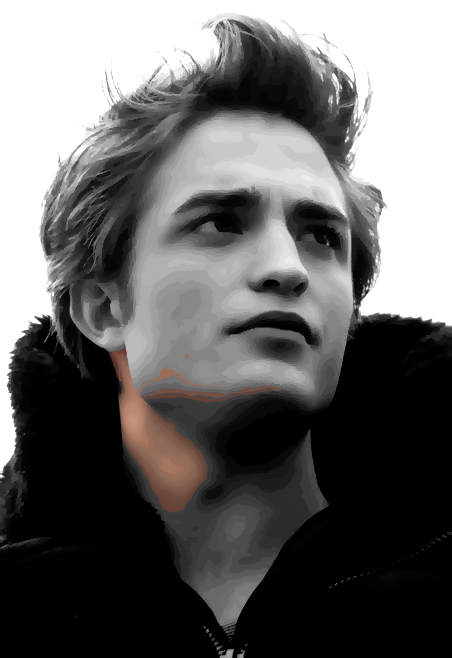
i'm working on my first vexel, but i'm stuck on what to do with the "borders" between two different objects, like this: (zoomed in)
 where there's all the funky colors and stuff. i already have a copy of the original smart blurred image on top of the posterized image, set to color, to reduce the awkward colors. any tips? |
|
|
|


 |
Replies
(1 - 3)
|
Jun 5 2008, 09:31 PM
Post
#2
|
|
 ;) Group: Duplicate Posts: 2,374 Joined: Feb 2004 Member No: 3,760 |
hm. what program are you using? and can you please put another not-zoomed-in example up?
|
|
|
|


|
Jun 5 2008, 09:35 PM
Post
#3
|
|
 in a matter of time Group: Staff Alumni Posts: 7,151 Joined: Aug 2005 Member No: 191,357 |
I like to introduce a third layer, a grayscale layer, while vexelling. Sometimes it's difficult to see the differences in darkness between two colours, so setting the entire image to grayscale simplifies a lot. Now you're just worrying about one shade of a colour (no colour at all!).
Also, I'd suggest looking at the entire image as a whole instead of focusing on little pixels to determine how you would move on. |
|
|
|

|
Jun 6 2008, 11:54 AM
Post
#4
|
|
|
AKA RockIt Studios Group: Official Member Posts: 2,286 Joined: Jun 2006 Member No: 421,809 |
^thanks for the tips. this is my first vexel so i'm really kind of unsure.
the posted image is the border between skin and clothes. and i'm using Photoshop CS2. this is the image i'm doing. i'm completely scared on the borders.  this is what I have so far... |
|
|
|

 |
1 User(s) are reading this topic (1 Guests and 0 Anonymous Users)
0 Members: