HOW IS THIS DONE??, Texture wise |

 Apr 1 2008, 08:02 PM Apr 1 2008, 08:02 PM
Post
#1
|
|
|
Senior Member  Group: Member Posts: 57 Joined: Oct 2007 Member No: 583,227  |
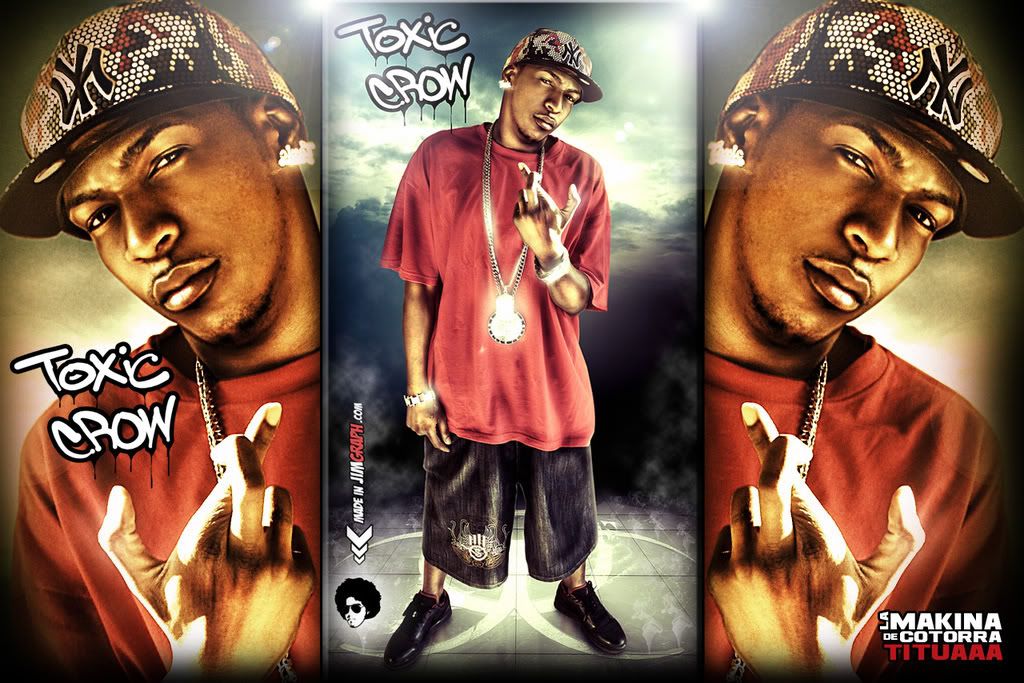
Take a look at this pic I tried taking a pic and doing the same in photoshop with the filter gallery i dont know of this a plugin for photoshop or if it is even made with photoshop.
Im talking about the way the picture is rendered it looks kind of like a professional CD cover and the texture of the skin in more 3d like and it stands out more than it would normally do. Does anybody know any links to tutorials or any tips on how to make a picture look like these?
Reason for edit: Thumb your images using [thumb] tags. -MissHygienic
|
|
|
|





 |
Replies
(1 - 11)
|
Apr 2 2008, 12:12 PM
Post
#2
|
|
 drama is so intising i might just bite a mothaf**ka like tyson Group: Member Posts: 266 Joined: Mar 2008 Member No: 636,361 |
It looks like they sharpened it quite a bit. but could be something else, not sure. try opening photoshop and trying out the effects
|
|
|
|

|
Apr 2 2008, 12:15 PM
Post
#3
|
|
 Sing to Me Group: Member Posts: 1,825 Joined: Apr 2004 Member No: 10,808 |
I accidentally did that a few times. I had duplicated the image and changed the top image's blending options.
I think if you posterize it first and then changed the postered one's blending options over the original, you get something like it. |
|
|
|

|
Apr 2 2008, 04:07 PM
Post
#4
|
|
|
Senior Member Group: Member Posts: 57 Joined: Oct 2007 Member No: 583,227 |
I tried it but it doesn't quite look the same. Maybe there more to it?

|
|
|
|
|
Apr 3 2008, 03:41 PM
Post
#5
|
|
|
Senior Member Group: Member Posts: 57 Joined: Oct 2007 Member No: 583,227 |
Can anybody help? any photoshop wizkids lol please!?
|
|
|
|
|
Apr 5 2008, 08:32 AM
Post
#6
|
|
 Kissing for yesterday. Group: Official Designer Posts: 465 Joined: Sep 2007 Member No: 569,813 |
what i'd do is firs,t duplicate the layer.
now go to the different effects and select one which is a bit cartoony, change the levels. then set this to a different blending option. now duplicate the base and drag it to the top. change the opacity but NOT the blending style unless necessary. keep doing this until you've got something you like, then merge layers and duplicate the layer on the duplicated layer, sharpen it then set the opacity to something between 10-30% (will vary depending on which picture you use) to be honest, try to be individual and create something a bit different to the images shown, its boring seeing lots of images with the same effect, try to do a "take" on it but not an exact copy  it would help if you showed the image you wanted to use this effect on ? |
|
|
|


|
Apr 7 2008, 06:38 PM
Post
#7
|
|
|
Senior Member Group: Member Posts: 57 Joined: Oct 2007 Member No: 583,227 |
yea i tried doing that but i still cant get this effect its very challenging! ugh..... im stressed out! lol
|
|
|
|
|
Apr 8 2008, 12:11 AM
Post
#8
|
|
 sang loves hayden. Group: Staff Alumni Posts: 3,373 Joined: Feb 2004 Member No: 5,687 |
Have you tried asking the actual designer?
|
|
|
|

|
Apr 8 2008, 02:34 AM
Post
#9
|
|
|
Senior Member Group: Member Posts: 57 Joined: Oct 2007 Member No: 583,227 |
yea JIMGRAPH.COM they do the work but i guess that they do it as a bussiness so i dont think they would spread out their ideas like that.
|
|
|
|
|
Apr 8 2008, 08:06 AM
Post
#10
|
|
|
Kissing for yesterday. Group: Official Designer Posts: 465 Joined: Sep 2007 Member No: 569,813 |
hm to be honest i wouldn't lose sleep over it.
this seems to be a very very advanced effect..i don't think you'll be able to create the exact effect if the owners won't give a tutroial, but would you feel you could settle for something like it? i'd just keep playing with the images and maybe find a new effect that you like. |
|
|
|
|
Apr 8 2008, 12:51 PM
Post
#11
|
|
|
Senior Member Group: Member Posts: 57 Joined: Oct 2007 Member No: 583,227 |
If anyone was to search for a tutorial for this how would they search it? What would you type in google to search for you?
|
|
|
|
|
Apr 8 2008, 02:21 PM
Post
#12
|
|
 Resource Center Tyrant Group: Official Member Posts: 2,263 Joined: Nov 2007 Member No: 593,306 |
Probably photo retouching. This is advanced, professional photo retouching. It's a different approach to photo processing, and you're better off experimenting on your own.
|
|
|
|

 |
1 User(s) are reading this topic (1 Guests and 0 Anonymous Users)
0 Members: