Navbar Color Help |

 Mar 30 2008, 10:56 AM Mar 30 2008, 10:56 AM
Post
#1
|
|
|
Member  Group: Member Posts: 13 Joined: Oct 2006 Member No: 474,403  |
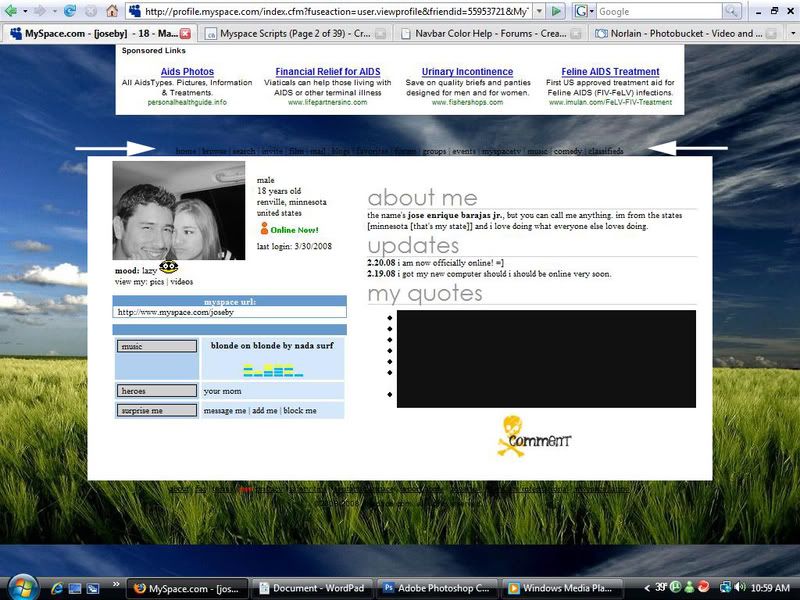
I recently removed that blue table at the top of the myspace page (the one under the ads). I have a problem though. The background picture that I am using is dark towards that top and the navbar links are black and hard to see. So my question is does anyone know how to change the color of the text so it's easier to see? I prefer them to be white.
Thanks in advance. -Joseby
Reason for edit: Thumb your images. -MissHygienic
|
|
|
|



 |
Replies
(1 - 2)
|
Mar 30 2008, 11:48 AM
Post
#2
|
|
 awestinnn Group: Member Posts: 624 Joined: Aug 2006 Member No: 460,069 |
This makes the navbar links white, and underlined on mouseover.
CODE a.navbar:active, a.navbar:visited, a.navbar:link { font-family:arial; color:FFFFFF; font-size:10px; } a.navbar:hover { font-family:arial; color:FFFFFF; font-size:10px; text-decoration:underline; } You can change "Arial" and "10px" to whatever font/size you want. |
|
|
|


|
Mar 30 2008, 11:54 AM
Post
#3
|
|
 DDR \\ I'm Dee :) Group: Mentor Posts: 8,662 Joined: Mar 2006 Member No: 384,020 |
Make sure you check out the pinned topics, like the Making A Layout one, before you post your own.
 CODE <style>a.navbar:active, a.navbar:visited, a.navbar:link { color:ffffff;} a.navbar:hover {color:ffffff;}</style> |
|
|
|


 |
1 User(s) are reading this topic (1 Guests and 0 Anonymous Users)
0 Members: