how do i do this? |

 Dec 25 2006, 07:40 PM Dec 25 2006, 07:40 PM
Post
#1
|
|
|
Senior Member  Group: Member Posts: 30 Joined: Jul 2006 Member No: 441,029  |
ok so in the picture below u see like next 2 juel santana their is like a transperant type lil box how do u do that?
link :: http://img151.imageshack.us/img151/7826/juelz0001wb8.png |
|
|
|




 |
Replies
(1 - 2)
|
Dec 25 2006, 07:55 PM
Post
#2
|
|
|
<3 Group: Member Posts: 455 Joined: Jul 2006 Member No: 445,104 |
You just make a shape box in photoshop and set the transparent to 50% or whatever you like to make it see through.
|
|
|
|
|
Dec 27 2006, 06:22 AM
Post
#3
|
|
 xXbernisXx Group: Member Posts: 493 Joined: Jul 2006 Member No: 433,317 |
more especific
simply..  pick the custom shape tool (1) make sure you have paths (2) selected and then choose the rounded rectangle tool(3) make your rectangle. right click and make a selection 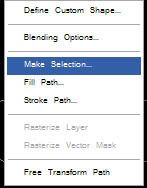 then press ok fill your selection with the pain bucket tool in this case is white on your image but u could do any color and lastly lower the opacity to 50% you can also make a stroke by going to image/stroke. |
|
|
|

 |
1 User(s) are reading this topic (1 Guests and 0 Anonymous Users)
0 Members: