Outline. |

 Dec 17 2006, 10:02 AM Dec 17 2006, 10:02 AM
Post
#1
|
|
 Your mom  Group: Member Posts: 149 Joined: Aug 2005 Member No: 201,903  |
 There was a tutorial on double stroking the text in photoshop. But .. when I did it, it looked kinda different from the picture above. Mine looked more dirty and messy. Does anyone have another way of outlining like that? I use Photoshop 7 (: |
|
|
|




 |
Replies
(1 - 17)
|
Dec 18 2006, 02:26 AM
Post
#2
|
|
 xXbernisXx Group: Member Posts: 493 Joined: Jul 2006 Member No: 433,317 |
Here are these links i hope
this are it. or related to what you want  http://www.pstutz.com/index.php?ID=29 http://www.tutorialized.com/tutorial/Doubl...roke-Text/11491 http://tutorialoutpost.com/count/5186 http://www.websitetemplatedesign.com/oscom...orial_239.shtml |
|
|
|

|
Dec 18 2006, 04:24 PM
Post
#3
|
|
|
Your mom Group: Member Posts: 149 Joined: Aug 2005 Member No: 201,903 |
Oh, cool.
Thank you. But umm.. I tried it, and it looked different. My outline looks more smoother. Look, take a look at what I mean.  Mine. Creator's. Do you see how their outline is more edgy sharp kinda. Mine's really smooth looking. |
|
|
|
|
Dec 18 2006, 05:44 PM
Post
#4
|
|
|
xXbernisXx Group: Member Posts: 493 Joined: Jul 2006 Member No: 433,317 |
yes i see the difference ..
you cant really tell the difference but i see what you mean.. that is because the creator's has some sort of gradient(take a close view) if you want just try playing with the opacity of the outline it will work just a lil bit.. you know what i mean? |
|
|
|
|
Dec 18 2006, 06:56 PM
Post
#5
|
|
|
Your mom Group: Member Posts: 149 Joined: Aug 2005 Member No: 201,903 |
Hmm, I tried.
Ehh, sorry but it doesn't do much lol. Sorryy. Oh gosh.. I don't know. Maybe they did something else than stroking it. Who knows. |
|
|
|
|
Dec 18 2006, 07:08 PM
Post
#6
|
|
 chinky Group: Official Designer Posts: 2,566 Joined: Jul 2006 Member No: 434,437 |
Probly used the pen tool or something :]
|
|
|
|


|
Dec 18 2006, 07:24 PM
Post
#7
|
|
|
Your mom Group: Member Posts: 149 Joined: Aug 2005 Member No: 201,903 |
Hahaha, oh I wish.
People these days use pen tool a lot. Well, I attempted to use it and whoa big mistake. I really don't know how it works. It's kinda confusing. .... is there an easier way? Oh mann 
|
|
|
|
|
Dec 18 2006, 07:30 PM
Post
#8
|
|
|
xXbernisXx Group: Member Posts: 493 Joined: Jul 2006 Member No: 433,317 |
its because the creator's has a
gradient! heheh thats why .. yours look more bold and theirs is light |
|
|
|
|
Dec 18 2006, 07:49 PM
Post
#9
|
|
|
Your mom Group: Member Posts: 149 Joined: Aug 2005 Member No: 201,903 |
Mmm, what do you mean by creator-used-gradient?
For the stroking? Or for the overlay of the text? I don't know, but I'm telling you mine comes out fat lol. |
|
|
|
|
Dec 18 2006, 08:31 PM
Post
#10
|
|
|
xXbernisXx Group: Member Posts: 493 Joined: Jul 2006 Member No: 433,317 |
you see how the
bottom of the text is kind of greenish.. and the middle brownish and the top of the tex red? can you see that?? well thats a gradient this kind of explains it.. 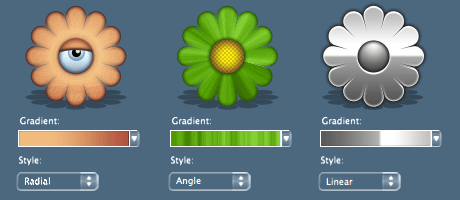 add a gradient to your text: 1. right click on your text layer (located on the layer palete and choose Blending Options. 2.check the box in Gradient Overlay and use the options as you like. 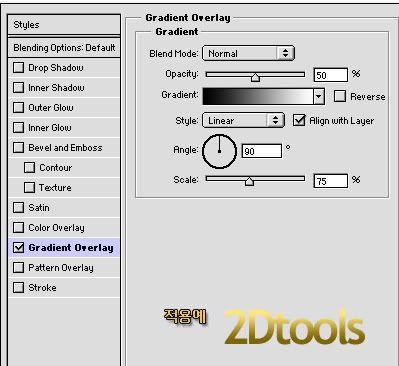
|
|
|
|
|
Dec 18 2006, 11:10 PM
Post
#11
|
|
|
Your mom Group: Member Posts: 149 Joined: Aug 2005 Member No: 201,903 |
Oh, look .. Korean.
Hahaha, sorry anyways. Oh. You were talking about that? No, sorry, but I wasn't really talking about that lol. I meant the outlining. See how it's more sharp and edgy-ish? Well, mine's more like smooth and round. And I don't know how to do that. |
|
|
|
|
Dec 19 2006, 04:59 AM
Post
#12
|
|
|
xXbernisXx Group: Member Posts: 493 Joined: Jul 2006 Member No: 433,317 |
sorry ahha i thought
you were talkin bout the gradient but now! i got it!! i know what you talking about! ehheheh i see that yours is cruved and smooth and the creators is more edgy yup yup i know well i think it has to be something with this: 
|
|
|
|
|
Dec 19 2006, 04:13 PM
Post
#13
|
|
|
Your mom Group: Member Posts: 149 Joined: Aug 2005 Member No: 201,903 |
It's alright (:
Umm, okay I tried that too. And.. it didn't work. Oh brother. This is getting ridiculous lol. |
|
|
|
|
Dec 19 2006, 08:03 PM
Post
#14
|
|
|
xXbernisXx Group: Member Posts: 493 Joined: Jul 2006 Member No: 433,317 |
hahhah then i dont know ..ahhah
they problably used the pentool.. which it takes a lot of time haha.. nah.. i dont think so .. its too perfect.. well i cant think of anything ..thats all i can help you on.. |
|
|
|
|
Dec 20 2006, 04:37 PM
Post
#15
|
|
|
Your mom Group: Member Posts: 149 Joined: Aug 2005 Member No: 201,903 |
=/
Okay then. Thank you soo much though. I really appreciate your help. |
|
|
|
|
Dec 21 2006, 02:34 AM
Post
#16
|
|
|
xXbernisXx Group: Member Posts: 493 Joined: Jul 2006 Member No: 433,317 |
QUOTE(xjeaniiex @ Dec 20 2006, 1:37 PM)  =/ Okay then. Thank you soo much though. I really appreciate your help. you wellcome feel free to pm me |
|
|
|
|
Dec 21 2006, 01:50 PM
Post
#17
|
|
 Froggie! Woof woof. :D Group: Member Posts: 1,423 Joined: Nov 2004 Member No: 66,146 |
what font is that?
maybe I can try out some er things?.. haha |
|
|
|

|
Dec 21 2006, 03:08 PM
Post
#18
|
|
|
Your mom Group: Member Posts: 149 Joined: Aug 2005 Member No: 201,903 |
It's called Dyspepsia.
Click. |
|
|
|
 |
1 User(s) are reading this topic (1 Guests and 0 Anonymous Users)
0 Members: