graphic brightness help?, brightness effects |

 Nov 13 2006, 11:27 PM Nov 13 2006, 11:27 PM
Post
#1
|
|
 i'll always love him..  Group: Member Posts: 30 Joined: Apr 2004 Member No: 13,494  |
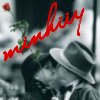
how do i make effects like the following?
  or like the first one except with any two colors i want. like the white area is a light green & the black is a darker green? thanks mucho appreciated. [; oh i'm looking to do it in psp 7, by the way. [; |
|
|
|




 |
Replies
(1 - 5)
|
Nov 15 2006, 07:53 PM
Post
#2
|
|
 mrs. paul dano. Group: Member Posts: 907 Joined: Nov 2006 Member No: 478,992 |
hmm.
this is for the second picture. make a new layer. set the blend mode to color and fill it with a brown color. |
|
|
|
|
Nov 20 2006, 08:59 PM
Post
#3
|
|
|
i'll always love him.. Group: Member Posts: 30 Joined: Apr 2004 Member No: 13,494 |
that wasn't exactly what i was looking for. i just want to know how to make the picture bright like that.
|
|
|
|
|
Nov 20 2006, 10:02 PM
Post
#4
|
|
 Pocketful of Sunshine Group: Staff Alumni Posts: 8,690 Joined: Nov 2005 Member No: 289,004 |
I'm not really sure about psp, but I'm sure there's blending modes, right? You just duplicate the layer and set the mode to screen.

|
|
|
|


|
Nov 22 2006, 12:38 AM
Post
#5
|
|
|
Photog Head Group: Member Posts: 63 Joined: May 2006 Member No: 413,203 |
change pic to b&w and increase brightness and contrast until its right
|
|
|
|

|
Dec 7 2006, 03:32 AM
Post
#6
|
|
|
i'll always love him.. Group: Member Posts: 30 Joined: Apr 2004 Member No: 13,494 |
thanks.
|
|
|
|
 |
1 User(s) are reading this topic (1 Guests and 0 Anonymous Users)
0 Members: