contact table., the links are off-centered? |
  |

 Apr 20 2006, 02:31 AM Apr 20 2006, 02:31 AM
Post
#1
|
|
|
.  Group: Member Posts: 3,264 Joined: Jan 2004 Member No: 761  |
ok, so i basically spent a few hours making my new contact table and when i insert it into myspace, it the links are just not where they're supposed to be.
[my myspace] (the code i used.) <style> .contactTable { width:300px !important; height:150px !important; padding:0px !important; background-image:url(http://i2.photobucket.com/albums/y14/x31aine/b198d9de.png); background-attachment:scroll; background-position:center center; background-repeat:no-repeat; background-color:transparent;} .contactTable table, table.contactTable td { padding:0px !important; background-color:transparent; background-image:none;} .contactTable a img {visibility:hidden; border:0px !important;} .contactTable a {display:block; height:28px; width:115px;} .contactTable .text {font-size:1px !important;} .contactTable .text, .contactTable a, .contactTable img {filter:none !important;} .contactTable .whitetext12 {display:none;} </style> if you highlight the contact table, you would see that the grey-ish boxes not directly on the text. do i have to redo my contact table or is there some way to fix this problem? |
|
|
|




|
Apr 20 2006, 02:44 AM
Post
#2
|
|
 There Are Strange Things Afoot At The Cirlce K Group: Member Posts: 1,130 Joined: Oct 2005 Member No: 253,395 |
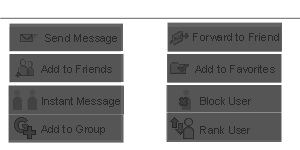
you will have to remake it, try using a template:
|
|
|
|

|
Apr 20 2006, 10:41 AM
Post
#3
|
|
|
. Group: Member Posts: 3,264 Joined: Jan 2004 Member No: 761 |
but is there anyway to combine the following codes to make it work on myspace?
1: <IMG SRC=" " BORDER=0 USEMAP=" "> <MAP NAME=" "> <AREA SHAPE="rect" COORDS="363,245,406,240" TARGET="imagemap_out" HREF="URL TO BE DIRECTED TO"> <AREA SHAPE="rect" COORDS="363,245,406,240" TARGET="imagemap_out" HREF="URL TO BE DIRECTED TO"> <AREA SHAPE="rect" COORDS="363,245,406,240" TARGET="imagemap_out" HREF="URL TO BE DIRECTED TO"> <AREA SHAPE="rect" COORDS="363,245,406,240" TARGET="imagemap_out" HREF="URL TO BE DIRECTED TO"> <AREA SHAPE="rect" COORDS="363,245,406,240" TARGET="imagemap_out" HREF="URL TO BE DIRECTED TO"> <AREA SHAPE="rect" COORDS="363,245,406,240" TARGET="imagemap_out" HREF="URL TO BE DIRECTED TO"> <AREA SHAPE="rect" COORDS="363,245,406,240" TARGET="imagemap_out" HREF="URL TO BE DIRECTED TO"> <AREA SHAPE="rect" COORDS="363,245,406,240" TARGET="imagemap_out" HREF="URL TO BE DIRECTED TO"> </MAP> and 2: <style> .contactTable { width:300px !important; height:150px !important; padding:0px !important; background-image:url(http://i2.photobucket.com/albums/y14/x31aine/b198d9de.png); background-attachment:scroll; background-position:center center; background-repeat:no-repeat; background-color:transparent;} .contactTable table, table.contactTable td { padding:0px !important; background-color:transparent; background-image:none;} .contactTable a img {visibility:hidden; border:0px !important;} .contactTable a {display:block; height:28px; width:115px;} .contactTable .text {font-size:1px !important;} .contactTable .text, .contactTable a, .contactTable img {filter:none !important;} .contactTable .whitetext12 {display:none;} </style> thanks! |
|
|
|
|
Apr 20 2006, 04:51 PM
Post
#4
|
|
 What's my name? Janette. and ily. <3 Group: Member Posts: 2,139 Joined: Apr 2006 Member No: 391,911 |
I don't believe so, just try using a regular code.
And, it aligns perfectly in Firefox. |
|
|
|
|
Apr 20 2006, 11:14 PM
Post
#5
|
|
|
t-t-t-toyaaa Group: Official Member Posts: 19,821 Joined: Apr 2004 Member No: 11,270 |
QUOTE(elainedcuzunome @ Apr 20 2006, 8:41 AM)  but is there anyway to combine the following codes to make it work on myspace? 1: <IMG SRC=" " BORDER=0 USEMAP=" "> <MAP NAME=" "> <AREA SHAPE="rect" COORDS="363,245,406,240" TARGET="imagemap_out" HREF="URL TO BE DIRECTED TO"> <AREA SHAPE="rect" COORDS="363,245,406,240" TARGET="imagemap_out" HREF="URL TO BE DIRECTED TO"> <AREA SHAPE="rect" COORDS="363,245,406,240" TARGET="imagemap_out" HREF="URL TO BE DIRECTED TO"> <AREA SHAPE="rect" COORDS="363,245,406,240" TARGET="imagemap_out" HREF="URL TO BE DIRECTED TO"> <AREA SHAPE="rect" COORDS="363,245,406,240" TARGET="imagemap_out" HREF="URL TO BE DIRECTED TO"> <AREA SHAPE="rect" COORDS="363,245,406,240" TARGET="imagemap_out" HREF="URL TO BE DIRECTED TO"> <AREA SHAPE="rect" COORDS="363,245,406,240" TARGET="imagemap_out" HREF="URL TO BE DIRECTED TO"> <AREA SHAPE="rect" COORDS="363,245,406,240" TARGET="imagemap_out" HREF="URL TO BE DIRECTED TO"> </MAP> and 2: <style> .contactTable { width:300px !important; height:150px !important; padding:0px !important; background-image:url(http://i2.photobucket.com/albums/y14/x31aine/b198d9de.png); background-attachment:scroll; background-position:center center; background-repeat:no-repeat; background-color:transparent;} .contactTable table, table.contactTable td { padding:0px !important; background-color:transparent; background-image:none;} .contactTable a img {visibility:hidden; border:0px !important;} .contactTable a {display:block; height:28px; width:115px;} .contactTable .text {font-size:1px !important;} .contactTable .text, .contactTable a, .contactTable img {filter:none !important;} .contactTable .whitetext12 {display:none;} </style> thanks! Taking this template and redoing it would be easier for you. It lines up for me but none of the links work. Also you can't combine those two at all. I don't believe. You can download a template http://forum.myspace.com/index.cfm?fuseact...oupID=100636674 there. But you need photoshop. (download the psd) |
|
|
|


|
1 User(s) are reading this topic (1 Guests and 0 Anonymous Users)
0 Members: