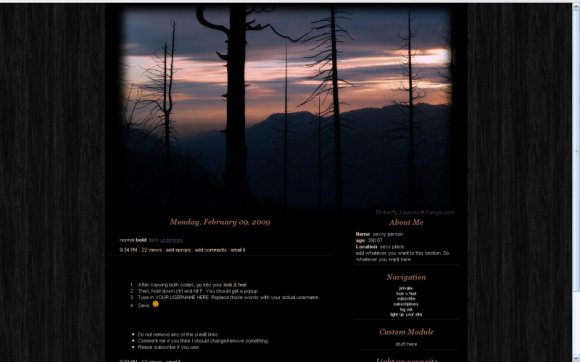
Designer's Comments
Look carefully for specific instructions
PLEASE VIEW THE LAYOUT ON A REAL XANGA TESTER--NOT CREATEBLOG'S
Click here.
1. After copying both codes, go into your look & feel.
2. Then, hold down ctrl and hit F. You should get a popup.
3. Type in YOUR USERNAME HERE. Replace those words with your actual username.
4. Save.
Click here.
1. After copying both codes, go into your look & feel.
2. Then, hold down ctrl and hit F. You should get a popup.
3. Type in YOUR USERNAME HERE. Replace those words with your actual username.
4. Save.
Using This Layout
For specific instructions read designer's comments
- 1. Disable Xanga themes (edit theme -> uncheck make this your active theme -> save)
- 2. Log into xanga.com (look & feel)
- 3. Copy (ctrl c) and paste (ctrl v) code to the specified fields
Layout Comments
Showing latest 6 of 6 comments

This is cute and I love the background :D
By dilligrout on Jul 24, 2009 9:20 am

Nice layouts!~~~ I love it & i'm using it right now!
However, I hv a question: How can i put javascripts (e.g. Rockyou Slideshow) onto the left module of this layout...it just can't show it out! ~ PLZ HELP!
Thank you!~ ^^
By kennethlau91 on Apr 16, 2009 10:08 am

Cool image.
By Medi on Mar 16, 2009 10:36 pm

i'm interested to know where you got this background exactly.
By brooklyneast05 on Feb 12, 2009 9:54 pm

I have a question. Since xanga now has their own layouts can i still use this one? Do i need to make any special changes? I really like your style.
By ModernMuse on Feb 12, 2009 8:12 pm

I don't use Xanga at all but this is a very very beautiful layout.
By piggyandsam on Feb 12, 2009 7:01 am
Layout Details
| Designer |
emberfly

|
| Submitted on | Feb 10, 2009 |
| Page views | 15,543 |
| Favorites | 39 |
| Comments | 6 |
| Reviewer |
Relentless
|
| Approved on | Feb 12, 2009 |
Layout Colors


