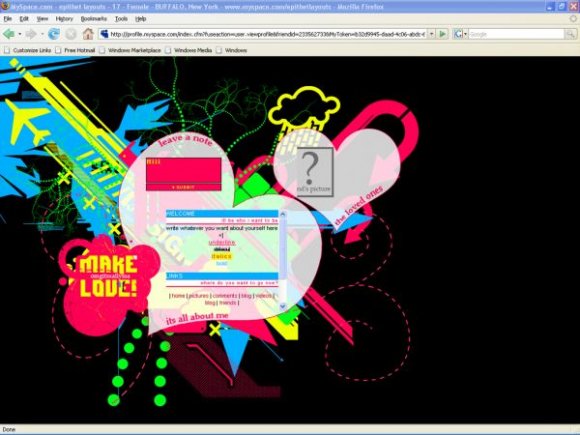
Designer's Comments
Look carefully for specific instructions
***************************************
NEW CODE
***************************************
REMEMBER TO DELETE ALL THE INSTRUCTIONS FOUND IN THE CODE
example: "< ! - - BLAHBLAH - - >"
***************************************
INSTRUCTIONS
***************************************
please change all "XXXXXX" to your myspace id number
when changing your friends picture, remember to change the url as well...
change "FRIENDSID" to their myspace id number
the dimension for the picture is 100 x 100
with this layout, you may change the colors for the bold, strikeout, italics, and underline if you wish
you may add more sections if you would like to
please do not remove my credit, or edit anything on the graphics and other div codes.
***************************************
HELP? / FAQ
***************************************
What is my friend's ID number?
- go to your friends page
- look up at the url
- example: http://profile.myspace.com/........friendid=151565090
- my friend's ID would be 151565090
- your friend's id is a bunch of number found after "friendid=" in the url of their myspace page
My friends arent showing up??
- wait a while on your page... it takes a while for the friends coding to show up the first couple times after you put the new layout up.
- [if they are showing "x's"]
make sure you did the coding for your friend's picture correctly
< i m g_s r c = "FRIENDSpictureURLhere">
change the _ to a space, and remove all spaces between the < and >
My Friends pictures are only showing half...
-Refresh the page
***************************************
TROUBLESHOOTING
***************************************
If you layout does not work, please follew the steps below =D
1. Login to Myspace then go to "EDIT PROFILE"
2. DELETE everything that is in "About Me" section, "I'd Like to Meet", "Interests", "Music", "Movies", "Television", "Books", and "Heroes" section.
3. Make sure that all the codes from past layouts are deleted.
4. Add the code below to the "About Me" section
5. Change all "XXXXXX" to your friend ID
6. Make sure you only delete "XXXXXX" to make sure that all your links work correctly
7. There is new code that helps you as you scroll down through the code.
8. REMEMBER TO DELETE ALL THE INSTRUCTIONS FOUND IN THE CODE
example: ""< ! - - BLAHBLAH - - >""
***************************************
ONLINE HELP XD
***************************************
add me as a friend on createblog and talk to me by commenting on my profile page =D
school is starting so i might not have enough time to help everyone, but i will definitely try
NEW CODE
***************************************
REMEMBER TO DELETE ALL THE INSTRUCTIONS FOUND IN THE CODE
example: "< ! - - BLAHBLAH - - >"
***************************************
INSTRUCTIONS
***************************************
please change all "XXXXXX" to your myspace id number
when changing your friends picture, remember to change the url as well...
change "FRIENDSID" to their myspace id number
the dimension for the picture is 100 x 100
with this layout, you may change the colors for the bold, strikeout, italics, and underline if you wish
you may add more sections if you would like to
please do not remove my credit, or edit anything on the graphics and other div codes.
***************************************
HELP? / FAQ
***************************************
What is my friend's ID number?
- go to your friends page
- look up at the url
- example: http://profile.myspace.com/........friendid=151565090
- my friend's ID would be 151565090
- your friend's id is a bunch of number found after "friendid=" in the url of their myspace page
My friends arent showing up??
- wait a while on your page... it takes a while for the friends coding to show up the first couple times after you put the new layout up.
- [if they are showing "x's"]
make sure you did the coding for your friend's picture correctly
< i m g_s r c = "FRIENDSpictureURLhere">
change the _ to a space, and remove all spaces between the < and >
My Friends pictures are only showing half...
-Refresh the page
***************************************
TROUBLESHOOTING
***************************************
If you layout does not work, please follew the steps below =D
1. Login to Myspace then go to "EDIT PROFILE"
2. DELETE everything that is in "About Me" section, "I'd Like to Meet", "Interests", "Music", "Movies", "Television", "Books", and "Heroes" section.
3. Make sure that all the codes from past layouts are deleted.
4. Add the code below to the "About Me" section
5. Change all "XXXXXX" to your friend ID
6. Make sure you only delete "XXXXXX" to make sure that all your links work correctly
7. There is new code that helps you as you scroll down through the code.
8. REMEMBER TO DELETE ALL THE INSTRUCTIONS FOUND IN THE CODE
example: ""< ! - - BLAHBLAH - - >""
***************************************
ONLINE HELP XD
***************************************
add me as a friend on createblog and talk to me by commenting on my profile page =D
school is starting so i might not have enough time to help everyone, but i will definitely try
Using This Layout
For specific instructions read designer's comments
- This is a div overlay layout, html knowledge required!
- 1. Log into myspace.com
- 2. Click on Edit Profile (Profile 1.0)
- 3. Copy (ctrl c) and paste (ctrl v) code to the specified fields
Layout Comments
Showing latest 10 of 136 comments

This is really, really cute and outstanding but I could 'swear' I have seen this exact type at Whateverlife.com. I'm not suggesting anything; simply saying that I'm pretty certain ( but not 100%) that I have looked at this on Ashbo's site.
Anyway, it's cute so whatever...
By Butterface89 on Jul 29, 2010 3:03 am

oh nd can i use it?
By pumpkinalways22 on Nov 26, 2009 1:59 pm
how do you put your freinds pic in ???
By pumpkinalways22 on Nov 26, 2009 1:53 pm

I REALLII LOVE DDIS LAYOUT...IS IT KK IF I USE???
IMA START SETTN IT UP KK
SO JUS LET MII KNO N IF NO DEN ILL TAKE IT OFF
:]
By yenym on Oct 11, 2009 3:13 pm
CAN I USE?
By shaluv825 on Sep 6, 2009 6:37 pm

can i use this please!?
By Dee9008 on Jul 17, 2009 9:43 pm
can i use?
By HisLoverForever16 on May 1, 2009 12:01 am
This layout is amazing :]
I love it!
By Somerandomkid on Apr 1, 2009 11:06 pm

looks great! wonderful job!
By calilani on Mar 28, 2009 6:16 pm
can i use this please?
By jozziegotswagg on Feb 26, 2009 5:39 am
Layout Details

Layout Colors
