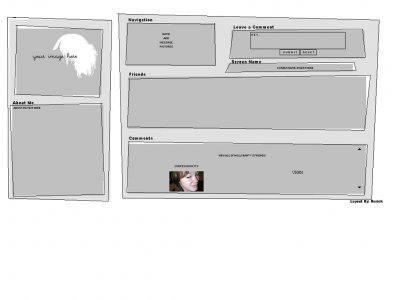
Designer's Comments
Look carefully for specific instructions
If your going to use this layout, make sure to go throughout the who id like to meet coding and find all the RAWRR and change ONLY those to your friend ID.
DO NOT edit anything in the about me section. Especially if your a beginner.
At the beginning of the who id like to meet coding you'll find this:
(http://i10.tinypic.com/3yobv46.jpgz)
Resize a image of yourself to 213 width x 164 height and change that url to your own once you upload the image to tinypic.com
To Edit the Friends div, find the FRIENDS SPACE in the who i'd like to meet part, You can erase the FRIENDS SPACE, and put links for your friends or images of them, to do so make sure to keep to the images under the height of 130, or it won't look right. You can also put all these images in to a marquee by simple doing this:
IMAGES OF FRIENDS
If you have any other questions or need something further explained feel free to PM me or contact me on AIM.
AIM name is on my profile.
Sorry if I confused anyone >_<
PS_ There is a credit link to my createblog profile on this layout, please do not remove it. If I find people are I will just add it in new places :]
Using This Layout
For specific instructions read designer's comments
- This is a div overlay layout, html knowledge required!
- 1. Log into myspace.com
- 2. Click on Edit Profile (Profile 1.0)
- 3. Copy (ctrl c) and paste (ctrl v) code to the specified fields
Layout Comments
Showing latest 10 of 33 comments

This is really plain...but I love it:]

this is hard work. rofl

I love this, it gray!!
Haha, (:

Its not my layout, obviously. I just coded it for someone else as a request and back the rules were set so you had to submit the requested layouts *shrug
pretty old layout to comment on o_O

I really don't think you have to worry about the hair thing. It's from a picture of a Japanese artist, and those kind are thrown around all of the time.
I really like the design and everything, just wish there wasn't a white space on the left side so it could fit without me having to scroll to the right.
Nice though.

i luv how un-done everything looks
be careful, that hair is a copyrighted image by an artist on deviantart.com that has been circulating :] otherwise great layout ^_^
-thanks, although im not to worried about it if they want to throw a hissy fit then so be it its just a image i can remove and make over. :]

be careful, that hair is a copyrighted image by an artist on deviantart.com that has been circulating :] otherwise great layout ^_^
How do I find my friendid?
thats way to plain
Layout Details
| Designer |
Insurmountable

|
| Submitted on | Sep 18, 2006 |
| Page views | 220,538 |
| Favorites | 313 |
| Comments | 33 |