smile for all of eternity... (comments)
Displaying 1 - 20 of 30 comments

Any plans to port this to a s2 layout? so that I can view the location field? not that it's all that important though..
I'd greatly appreciate it if someone could fix the misalignment in the main content block, I've temporarily switched to this theme and it is viewable, in the hopes that someone can fix it and therefore revive it once again, it's very beautiful indeed.

totally love it and using it http://candiland84.livejournal .com/ its awesome i credited the site in a friends blog thankx again :)


Is there anyway to get this layout fixed? Header works, but my alignment is all out of whack, they overlap and stuff.

this is a cute layout...
however, it's all miss aligned on my computer.
maybe just the difference in computer screens sizes and resolutions.
Like everyone here, I have the same problem: the image doesn't show up and the whole thing is messed up. I have set everything in generator though... I don't know why... ^^;
http://kage-no-tsuki.li vejournal.com/
I'm having a problem it wont let me use global head my layout is off center the picture ont show up and I cant get the side bar. I dont know what to do.
http://lonley-soul.live journal.com/

It looks great on my page, its misaligned, how can I correct that?? I'm using aol is that makes a difference.
I adore this layout, unfortunately LJ no longer allows "GLOBAL_HEAD" overrides. I don't know what it would take to change the coding, but that's why nobody can use it now.
I'm also having the same problem as aisasami. I tried everything I could think of, but the banner and the sidebar links won't appear at all.http://blue-ribbongirl.livejournal.com/
Hi! I cannot get the sidebar links or to the image to appear. I tried everything but it hasn't worked.Here is my LJ, if you want to take a look:http://aisasami.livejournal.com/

double check that you have all styles set to generator, and i'll look over your code in a seci couldn't find this in your code:CODE<img src="http://images.cbimg4.com/livejournal/16/3783.jpg" class="x" style="display:
make sure that you have everything set to generator, and a webpage url in your profile.
QUOTE(Luna Lovegood @ Oct 18 2006, 2:54 PM) [snapback]2321440[/snapback]I'm having a different problem. (Nice to know I'm not the only one with problems with journals, lol.) For some reason, the tables don't seem to line up, and my
I was having the same problem, using Firefox. I fixed it by first making sure something was in the URL box in your profile....I am told you can put any url, I just put the url of the layout. Then go into your customize and make sure all your layout dropdo

the ss looks great but it's really misaligned on my computer maybe because i am using IE i don't know
Add Comment
You must be logged in to comment
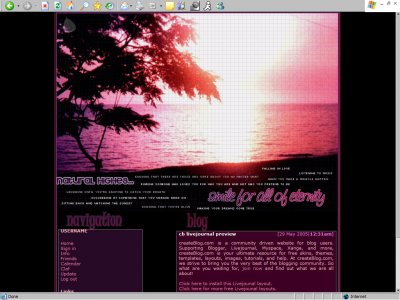
Layout Details
| Designer |
pawprints2570

|
| Submitted on | Aug 10, 2005 |
| Page views | 147807 |
| Favorites | 124 |
| Comments | 30 |
| Reviewer |
Libertie
|
| Approved on | Jan 1, 1970 |