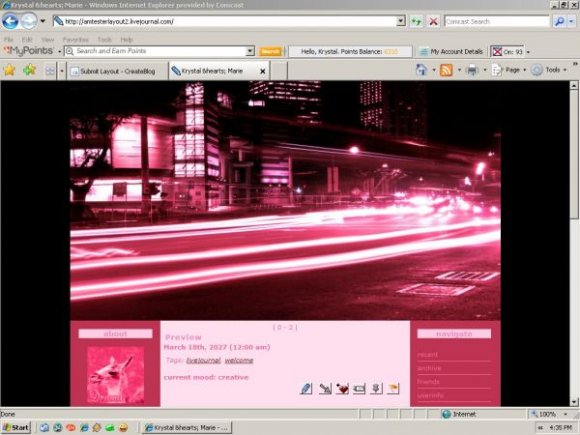
Designer's Comments
Look carefully for specific instructions
NOTE: After each section that you change, you may be asked if you want to save your changes before going on to the next section. You must select YES each time.
STEP 1: Open http://www.livejournal.com/customize/#layout in a new window
STEP 2: The Title section is completely optional, so if you would like to have a personalized journal title, subtitle, and friends list title, you can enter whatever your little heart desires, otherwise you can leave it blank. The link that talks about modifying your link list is pretty easy to follow once you click into it, having a link list is optional, and best saved until after you are finished installing your layout. In the Style System section, make sure you select S2.
STEP 3: Click on the box that says "theme,layout or designer". Type in 3 Column (it may automatically fill in) and hit search.
STEP 4: Click where it says "Appply Theme" under the FIRST layout style (Agent Orange). Don't worry about the colors, we will change them shortly.
STEP 5: Click where it says "Text". Here you decide what (if anything) you want to write in your "free text" area.
STEP 6: Click on the Custom CSS sub-tab. Select "No" where it says "Use layout's stylesheet(s)". Then Scroll down to where it says "Custom Style Sheet" and paste the codes that I have provided in this post.
STEP 7: Save your changes and enjoy your new layout!
Using This Layout
For specific instructions read designer's comments
- 1. Log into livejournal.com (customize)
- 2. Set Style System to S2
- 3. Click on Look and Feel
- 4. Set Layout to 3 Column
- 5. Click on Custom Options
- 6. Click on Custom CSS
- 7. Copy (ctrl c) and paste (ctrl v) code to Custom CSS
Layout Comments
Showing latest 10 of 20 comments

Sorry wrong window LOL, but I love this theme too, especially since it works with s2
I'd greatly appreciate it if someone could fix the misalignment in the main content block, I've temporarily switched to this theme and it is viewable, in the hopes that someone can fix it and therefore revive it once again, it's very beautiful indeed.

Love it! Totally using it :-)
this works really well...but theres an add thing that may get in the way. i just uploaded this fine tho. its great. :D

I love this. Am so using it.

This is so ah-mazing..
I wish you would make a myspace version :[

This one I am using on my LJ thanks for putting it together.
Thanks for using my image.
http://shinbi.devian tart.com/art/pink-21762527
-shinbi

i lied..i got it. =D
I love the layout, but all my text is to the left, and because of the ads the links are hidden.
Layout Details
| Designer |
autumn-mist

|
| Submitted on | Feb 3, 2008 |
| Page views | 51,617 |
| Favorites | 87 |
| Comments | 20 |
| Reviewer |
S-Majere
|
| Approved on | Feb 3, 2008 |