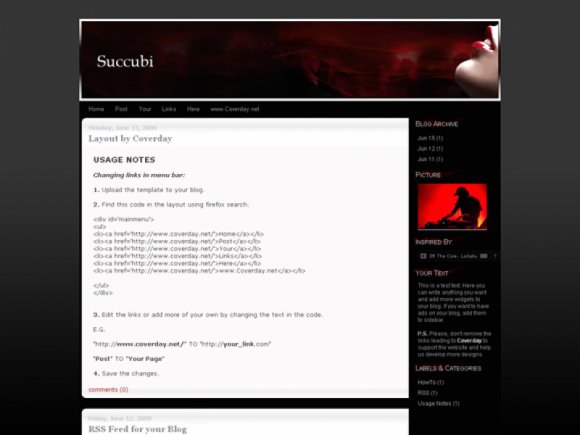
Designer's Comments
Look carefully for specific instructions
MADE BY Coverday
- IMPORTANT!!! -
If the CreateBlog preview does NOT look the same as on the photo, try uploading it to YOUR blog to check how it really would appear, or see this Live Preview.
- USAGE NOTES -
Changing links in menu bar:
1. Go to Blogger - Dashboard - Layout - Edit HTML
2. Upload/Paste the template to your blog.
3. Find this code in the layout using Firefox search (without the spaces):
< li >< a href='http://www.coverday.net/' > Home < /a >< /li >
< li >< a href='http://www.coverday.net/' > Change this link < /a > < /li >
< li > < a href='http://www.coverday.net/' > And this link < /a > < /li >
< li > < a href='http://www.coverday.net/' > Yeah, this too < /a > < /li >
4. Edit the links or add more of your own by changing the text in the code.
E.G.
"http://coverday.blogspot.com/" TO "http://YOUR_URL.blogspot.com/"
"Link 1" TO "My Page"
5. Save the changes.
-CHANGING RSS URL-
Go to Blogger - Dashboard - Layout - Edit HTML
Find in the layout code:
"http://coverday.blogspot.com/feeds/posts/default" and replace it with your own feed url.
E.G. http://Your_Blog.blogspot.com/feeds/posts/default
- IMPORTANT!!! -
If the CreateBlog preview does NOT look the same as on the photo, try uploading it to YOUR blog to check how it really would appear, or see this Live Preview.
- USAGE NOTES -
Changing links in menu bar:
1. Go to Blogger - Dashboard - Layout - Edit HTML
2. Upload/Paste the template to your blog.
3. Find this code in the layout using Firefox search (without the spaces):
< li >< a href='http://www.coverday.net/' > Home < /a >< /li >
< li >< a href='http://www.coverday.net/' > Change this link < /a > < /li >
< li > < a href='http://www.coverday.net/' > And this link < /a > < /li >
< li > < a href='http://www.coverday.net/' > Yeah, this too < /a > < /li >
4. Edit the links or add more of your own by changing the text in the code.
E.G.
"http://coverday.blogspot.com/" TO "http://YOUR_URL.blogspot.com/"
"Link 1" TO "My Page"
5. Save the changes.
-CHANGING RSS URL-
Go to Blogger - Dashboard - Layout - Edit HTML
Find in the layout code:
"http://coverday.blogspot.com/feeds/posts/default" and replace it with your own feed url.
E.G. http://Your_Blog.blogspot.com/feeds/posts/default
Using This Layout
For specific instructions read designer's comments
- 1. Log into blogger.com
- 2. Click on Layout
- 3. Click on Edit HTML
- 4. Copy (ctrl c) and paste (ctrl v) code to Template
Layout Comments
Showing latest 3 of 3 comments

Not working for me, I get this error: Your template could not be parsed as it is not well-formed. Please make sure all XML elements are closed properly.
XML error message: The reference to entity "dir" must end with the ';' delimiter.
Also, I have tried some of the other templates, and the seem to take off the "google bar" at the top of free blogger sites. This is against blogger rules, how do I go about adding that bar back to my page?
By AlanCayce on Jul 4, 2009 7:51 am

nooiiiceee. :D
By Mikeplyts on Jun 26, 2009 11:59 pm
Layout Details
| Designer |
LyssaAlex

|
| Submitted on | Jun 26, 2009 |
| Page views | 15,333 |
| Favorites | 12 |
| Comments | 3 |
| Reviewer |
A1Bassline
|
| Approved on | Jun 26, 2009 |
Layout Colors


