Tutorial
Click on thumbnailed images to enlarge
001.open your image and duplicate it Ctrl+J
002.go to filtre-->blur-->guassian blur and set it to 2.0 on the duplicated layer
003.on that same layer set the layer mode to hard or soft light. which ever you like better
004.and yay! your done.
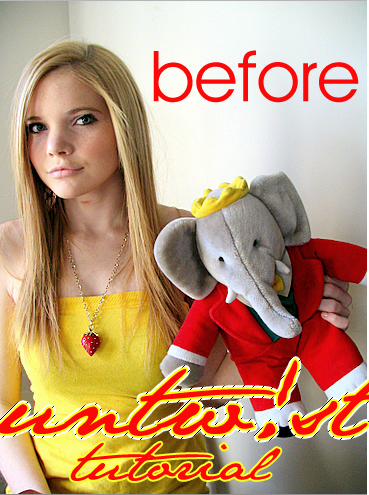
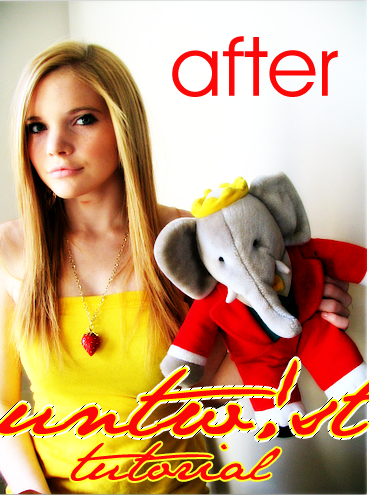
below are photos that i used. and i did hard light not soft.
002.go to filtre-->blur-->guassian blur and set it to 2.0 on the duplicated layer
003.on that same layer set the layer mode to hard or soft light. which ever you like better
004.and yay! your done.
below are photos that i used. and i did hard light not soft.
Tutorial Comments
Showing latest 10 of 15 comments

skkkkkank lmao!
By LaLa7oh7 on Jul 23, 2009 7:30 am
i dont get it its still a weird blur O_o
By creampuff123 on Jul 11, 2008 6:47 am
Sweet
By aleysha on Jul 7, 2008 11:55 pm

cool-e-o!
By NoWorriesDesigns on Jul 7, 2008 12:05 am
thank you for the tutorial really easy steps to follow^-^
By mzkinkyz17 on Apr 3, 2008 3:53 pm
to anila, the scratched on her neck would probably, a lovebite! hoho~ xD
By aerieysygs on Mar 1, 2008 7:56 am
how do you set the layer mode?
sorry, im new at this (:
By fallenxstar on Feb 25, 2008 8:26 pm

lovely tutorial! if that is a pic of you, you look lovely! :D but uh... did u get scratched on your neck? D:
By Anila on Feb 11, 2008 3:49 am
gorgeous.
By iflyhighinthesky on Jan 5, 2008 8:18 pm

easy, and nice.
By turnupthevolume on Jan 5, 2008 4:35 am
Tutorial Details
| Author |
sarahxboys

|
| Submitted on | Dec 30, 2007 |
| Page views | 21,304 |
| Favorites | 124 |
| Comments | 15 |
| Reviewer |
sweetasphyxia
|
| Approved on | Dec 30, 2007 |