Tutorial
Click on thumbnailed images to enlarge

1.open up your photo.I'm using Joe Jonas.
2.click on
adjust>gamma correct

3.set the level to 1.40. make sure channel is on Alls.

4.Then click
adjust>hue/saturation

5.set saturation to 40%.leave hue at 0.

6.then click
adjust>color balance

7.set them all to the right to 10%
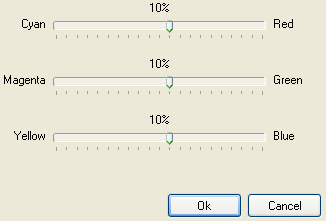
8.click on
adjust>levels
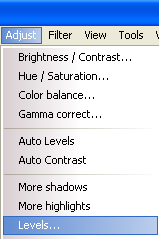
9.set them all to right.

DONE!
Tutorial Comments
Showing latest 10 of 10 comments

i love it!
By emilbia on May 8, 2009 3:59 am
omg. i effin love it.
By owlplushie on Apr 26, 2009 2:59 pm
ahh, this is so cool.
C: thanks!
By abbyfersure on Apr 14, 2009 2:24 am
ohh kewl! =)
By cutegurl712 on Nov 7, 2008 9:10 pm

favorited.:)
By asdfMelhunny on Oct 6, 2008 3:03 am
this is great. :)
By jamiexallxover on Sep 21, 2008 11:11 pm

this is cool.
By creole on Aug 30, 2008 9:55 pm

awesome.
By milesapartproductions on Aug 29, 2008 7:19 am

thanks
By punkmimi on Aug 22, 2008 1:10 am

THANKS!
By xXcalebboylesXx on Aug 21, 2008 7:15 pm
Tutorial Details
| Author |
UNRVLDWRDS

|
| Submitted on | Aug 17, 2008 |
| Page views | 17,966 |
| Favorites | 46 |
| Comments | 10 |
| Reviewer |
schizo
|
| Approved on | Aug 17, 2008 |