
Tutorial
Click on thumbnailed images to enlarge
Step 1.
Open Picture

Step 2.
Select area you want to Censor.

Step 3.
Go to FILTER > PIXELATE > MOSAIC
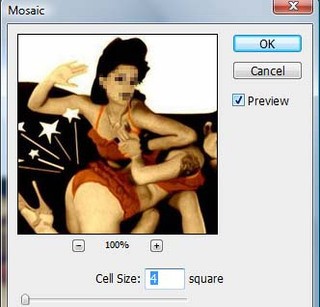
Final....

Open Picture
Step 2.
Select area you want to Censor.
Step 3.
Go to FILTER > PIXELATE > MOSAIC
Final....
Tutorial Comments
Showing latest 6 of 6 comments

Ha Ha I'ts like on T.V :D Good Job !
By cutiepoppie on Aug 14, 2009 2:57 pm

lol funny;
By fatmonsterx on Oct 30, 2008 8:20 pm

lmao at the picture you used. ima use this :]
By penis-chan on Sep 17, 2008 3:55 pm
Awesome thx!
By aleysha on Aug 5, 2008 8:23 pm

Great tutorial. Thanks [:
By iSbl on Aug 2, 2008 12:27 pm

Awsome I been wanting to learn this. =]
By ntv13 on Aug 1, 2008 7:09 pm
Tutorial Details
| Author |
aaapples

|
| Submitted on | Aug 1, 2008 |
| Page views | 19,259 |
| Favorites | 87 |
| Comments | 6 |
| Reviewer |
manny-the-dino
|
| Approved on | Aug 1, 2008 |